Introduction of Firewall in Computer Network
A firewall is a hardware- or software-based network security device that analyses all incoming and outgoing traffic and accepts, rejects, or drops that particular traffic in accordance with a predetermined set of security rules.
Allow: Permit the traffic
Block the traffic and respond with "unreachable error" if you reject.
Drop: obstruct traffic and leave a message
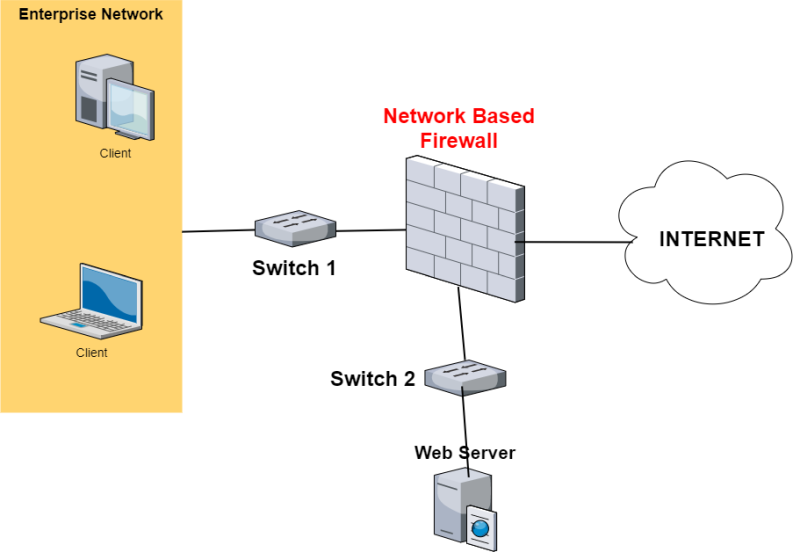
An external, untrusted network, such as the Internet, is separated from secured internal networks by a firewall.

History and Need for Firewall:-
- Access Control Lists (ACLs) kept networks secure before firewalls by being located on routers. ACLs are rules that specify whether a given IP address should be allowed or prohibited access to the network.
ACLs, however, are unable to identify the type of packets they are preventing. Additionally, ACL by itself is unable to prevent threats from entering the network. The Firewall was thereafter introduced.
- Organizations can no longer avoid having Internet access. However, having Internet connectivity benefits the company and allows external users to communicate with the internal network of the company. This puts the organisation in danger. We require a Firewall to protect the internal network from illegitimate traffic.
How Firewall Works:-
- Network traffic is compared by firewalls with the rule set specified in their table. As soon as the rule is matched, the network traffic is subjected to the associated action. As an illustration, one rule states that no employee from the HR department may access the data on the code server, but a different rule states that the system administrator may access the data from both the HR and technical departments. Rules can be set up on the firewall based on organisational requirements and security guidelines.
- Network traffic can be either outgoing or incoming from the viewpoint of a server. For each of these situations, the firewall maintains an own set of rules. Most of the outgoing traffic, which came from the server, was permitted to proceed. To increase security and stop undesirable communication, it is still always preferable to define a rule for outbound traffic.
- Different rules apply to approaching traffic. TCP, UDP, or ICMP are the three main Transport Layer protocols that make up the majority of traffic that passes through the firewall. There is a source address and a destination address for each of these categories. TCP and UDP have port numbers as well. Instead than using a port number to identify the purpose of a packet, ICMP employs a type code.
- Default policy: It is quite challenging to explicitly cover every firewall rule that could possibly exist. This necessitates that the firewall always have a default policy. Action is the only component of default policy (accept, reject or drop).
- Let's say the firewall has no rules about SSH connections to the server. It will therefore adhere to the default policy. Any computer outside of your office can connect to the server using SSH if the firewall's default policy is configured to accept. Therefore, it is always a good practise to set the default policy to drop (or reject).
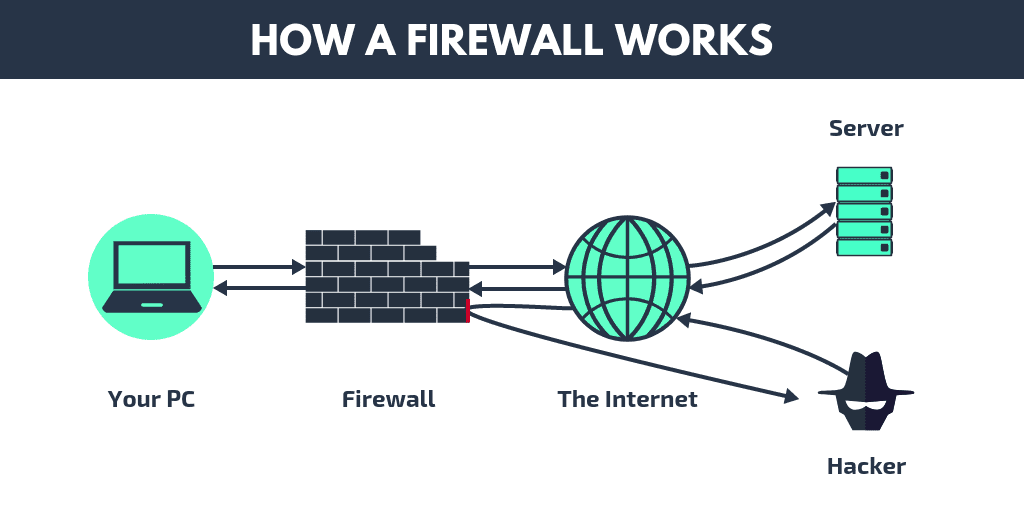
Generation of Firewall:-
Depending on when they were created, firewalls can be grouped.
- First-generation packet filtering firewalls: These firewalls monitor incoming and outgoing packets and decide whether to let them through or not depending on the source and destination IP addresses, protocols, and ports. It examines transport protocol layer traffic (but mainly uses first 3 layers).
Each packet is handled separately by packet firewalls. They are unable to determine whether a packet is a part of an active traffic stream. Based on distinctive packet headers, only It can approve or disapprove the packets.
- Second Generation Stateful Packet Inspection Firewall: Stateful firewalls (perform Stateful Packet Inspection) are more effective than packet filtering firewalls because they can tell the connection status of a packet. It monitors the status of network connections, including TCP streams, that pass through it. As a result, the filtering choices would take into account both the packet history in the state table and the set criteria.
- Third Generation- Application Layer Firewall: Application layer firewalls of the third generation may examine and filter packets at any OSI layer, all the way up to the application layer. It can determine when individual applications and protocols (like HTTP and FTP) are being abused and block specific material as well.
In other words, hosts that operate proxy servers are Application layer firewalls. Each packet must pass through the proxy in a proxy firewall in order to establish a direct connection between either side of the firewall. Depending on previously established restrictions, it might permit or prevent traffic.
- Next Generation Firewalls (NGFW): In order to prevent contemporary security breaches such advanced malware attacks and application-layer attacks, next generation firewalls are being used. To defend the network from these contemporary dangers, NGFW includes Deep Packet Inspection, Application Inspection, SSL/SSH Inspection, and many other features.
Types of Firewall:-
The two main types of firewalls are host-based and network-based.
- Host-based Firewalls: Each network node has a host-based firewall installed, which regulates all incoming and outgoing packets. It is a piece of software—or a group of software—that is included with the operating system. Network firewalls are unable to offer security inside a trusted network, necessitating the deployment of host-based firewalls. Each host is shielded from assaults and unauthorised access by a host firewall.

- Network-based Firewalls: Firewalls that operate on the network are called network-based firewalls. In other words, these firewalls filter all network traffic, including incoming and outgoing. By employing rules set up on the firewall to filter traffic, it defends the internal network.