File System Security in an operating system refers to the mechanisms and techniques used to ensure that files and directories are accessed, modified, and executed only by authorized users or programs. It is essential for protecting sensitive data, preventing unauthorized access, and maintaining the integrity of the file system.
How File System Security Works:
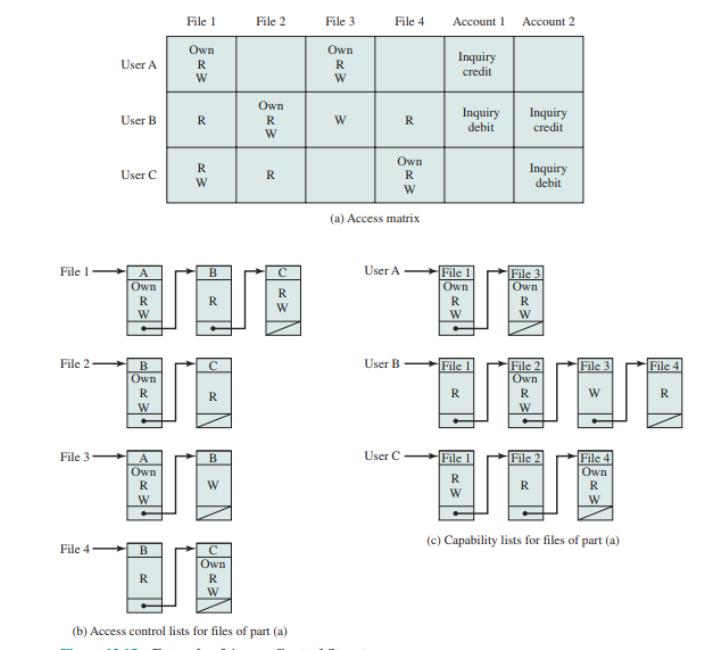
- Access Control Lists (ACLs): This defines the permissions for files and directories. ACLs specify who (users or groups) can read, write, or execute a file or directory.
- File Permissions: Most operating systems, such as Unix/Linux, Windows, and macOS, use file permissions to control access. These permissions are typically broken down into:
- Read (r): Ability to view the contents of a file or list directory contents.
- Write (w): Ability to modify the file or directory contents.
- Execute (x): Ability to execute the file (run it as a program) or enter the directory.
- Encryption: Files can be encrypted to prevent unauthorized access even if someone gains physical access to the storage medium. Only users with the correct decryption key can access the content.
- User Authentication: The system ensures that only legitimate users can access files by requiring login credentials (like username and password). Multi-factor authentication may also be used.
- User Roles and Groups: Users can be assigned roles or grouped together to simplify permission management. This way, an administrator can assign permissions to groups rather than individual users.
- Auditing and Logging: Security systems log access to files, especially sensitive ones, to track any suspicious activity. This helps in forensic analysis and determining potential threats or breaches.
Where File System Security Works:
- Operating Systems: File system security is implemented in the core of the operating system (such as Linux, Windows, and macOS). Each OS has its own way of handling permissions, encryption, and user management.
- Networked Systems: On systems connected via a network (like cloud storage), file system security is crucial to prevent unauthorized remote access.
- Servers: Web servers, file servers, and database servers use file system security to protect data from external and internal threats.
Example:
Consider a simple scenario in a Linux-based system. Suppose there is a file named project.txt, and there are two users on the system: Alice and Bob.
- The file might have the following permissions:
rwxr--r-- - rwx for the owner (Alice): Alice can read, write, and execute the file.
- r-- for the group: Members of Alice's group can only read the file.
- r-- for others: Bob (or anyone else) can only read the file, but not modify or execute it.
If Bob tries to modify project.txt, he will be denied permission because the file permissions do not grant him write access.