wisemonkeys logo
FeedNotificationProfileManage Forms
FeedNotificationSearchSign in
wisemonkeys logo

Blogs

Processes : Process description and control

profile
4475 Mit Gohil
Jul 05, 2024
0 Likes
0 Discussions
51 Reads

Processes in the context of computing refer to instances of executing programs on a computer system. Each process has its own memory space, resources, and execution context. Here's a breakdown of the key aspects related to processes:

  1. Process Description:
    • Program Execution: A process represents the execution of a program. It includes the program code, associated data, and resources like open files and network connections.
    • Memory Space: Each process typically has its own memory space, which includes the executable code, variables, stacks, heaps, etc.

    • Resource Allocation: Processes may require various system resources (CPU time, memory, files) which are allocated to them by the operating system.

      • Process ID (PID): A unique identifier assigned to each process by the operating system, which helps in managing and distinguishing between different processes.

      2.Process Control:

      • Creation: Processes are created either by the operating system when a program is started or by another process (parent process) using system calls like fork() (Unix-like systems) or CreateProcess() (Windows).
      • Scheduling: The operating system scheduler decides which process gets to use the CPU and for how long, based on scheduling algorithms (e.g., round-robin, priority-based scheduling).

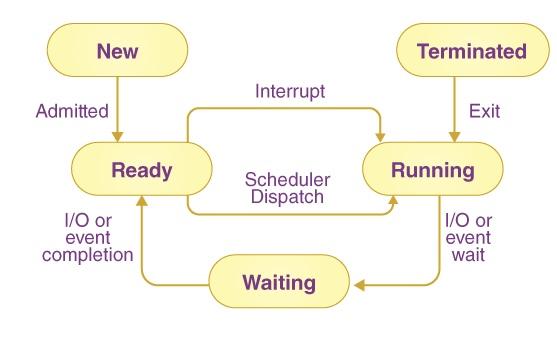
        Execution State: Processes transition between different states such as running, ready, waiting (blocked), or terminated. State transitions are managed by the operating system scheduler and are influenced by events like I/O operations, timers, and signals.

      • Termination: Processes can terminate either voluntarily (by calling exit) or involuntarily (due to errors or signals). Upon termination, resources allocated to the process are released by the operating system.                       

        3. Process Communication and Synchronization:

        • Processes often need to communicate and synchronize with each other, especially in multi-process or multi-threaded environments.
        • Mechanisms for inter-process communication (IPC) include shared memory, message passing (pipes, sockets, message queues), and synchronization primitives (mutexes, semaphores) to coordinate access to shared resources.

          4.Process States:

          • Running: The process is currently executing instructions on the CPU.
          • Ready: The process is ready to execute and waiting for its turn to be assigned to a CPU core.
          • Waiting (Blocked): The process is waiting for an event (such as I/O completion) or resource allocation (like memory) before it can proceed.
          • Terminated: The process has finished execution, and its resources have been released back to the system.
          • Understanding processes and their control is fundamental to operating system design, resource management, and application development, especially in ensuring efficient and stable execution of programs on a computer system.



Comments ()


Sign in

Read Next

Python as a tool for Data science task & project

Blog banner

How Does SSO Works

Blog banner

Answer

Blog banner

Direct Memory Access

Blog banner

10 Reasons to Date a South Indian Girl

Blog banner

ROLE OF THE COMPUTER FORENSICS TOOLS AND TECHNIQUES

Blog banner

Security in Cloud Computing Environment using cryptography - Rushabh Modi

Blog banner

Hacking

Blog banner

Navigating the Digital Battlefield: Security Breaches and Effective Countermeasures

Blog banner

Service Strategy principles

Blog banner

Virtual Machine

Blog banner

The Power of Teamwork: Learning Collaboration Through Everyday Activities

Blog banner

Buffering

Blog banner

What is Minting & Mining

Blog banner

Perfect Moments to Wear a Rich Patola Design Outfit

Blog banner

Self-love: Being the reason of your own smile

Blog banner

10 Signs your Computer has Virus

Blog banner

Evolution of Operating Sytems

Blog banner

DMZ: Your Secret Weapon for Data Security

Blog banner

SIEM Empowering Security

Blog banner

What is Vishing?

Blog banner

Importance of Morning Routines for Students During the Festive Season

Blog banner

Cache memory

Blog banner

IoT Evolution

Blog banner

RAID

Blog banner

breakup? don't worry and learn how to get back your life!

Blog banner

Data Storytelling: Turning Analysis into Business Action

Blog banner

GraphX:- A graph processing tool

Blog banner

Use case of K-means clustering

Blog banner

TRAIN TRAVELING

Blog banner

Mumbai

Blog banner

Interrupts in OS

Blog banner

Photorec - media recovery tool

Blog banner

Deadlock and Starvation

Blog banner

Technical SEO : Total Guide

Blog banner

Solving Problems with AI: The Power of Search Algorithms

Blog banner

Semaphores

Blog banner

Types of Malware in Cyber Security

Blog banner

Uniprocessor Scheduling

Blog banner

How User Data Shapes Personalised Campaigns

Blog banner

What is the point of living if we can die at any moment of our lives ?

Blog banner

I/O Management and Disk Scheduling

Blog banner