public class MainActivity extends Activity {
}

or

public class MainActivity extends AppCompatActivity {
}
public class MyService extends Service {
}
public class MyReceiver  extends  BroadcastReceiver {
   public void onReceive(context,intent){}
}
public class MyContentProvider extends  ContentProvider {
   public void onCreate(){}
}
Intent is a messaging object you can use to request an action from another app component.
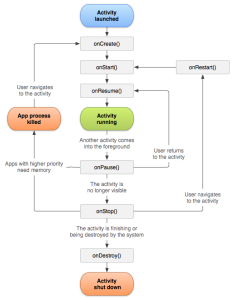 onCreate() -> This is the first method called when the activity is first created.
onStart() -> It is method called when the activity becomes visible to the user.
onResume() -> This method is called when the user starts interacting with the application.
onPause() -> In this state activity does not receive user input and cannot execute any code.
onStop() -> This method is called when the activity is no longer visible.
onDestroy() -> This method is called before the activity is destroyed by the system.
onRestart() -> This method is called when the activity restarts after stopping it.
Example of Activity Lifecycle
onCreate() -> This is the first method called when the activity is first created.
onStart() -> It is method called when the activity becomes visible to the user.
onResume() -> This method is called when the user starts interacting with the application.
onPause() -> In this state activity does not receive user input and cannot execute any code.
onStop() -> This method is called when the activity is no longer visible.
onDestroy() -> This method is called before the activity is destroyed by the system.
onRestart() -> This method is called when the activity restarts after stopping it.
Example of Activity Lifecycle
package com.example.helloworld;
import android.os.Bundle;
import android.app.Activity;
import android.util.Log;

public class MainActivity extends Activity {
   String msg = "Android : ";

   @Override
   public void onCreate(Bundle savedInstanceState) {
      super.onCreate(savedInstanceState);
      setContentView(R.layout.activity_main);
      Log.d(msg, "The onCreate() event");
   }

   @Override
   protected void onStart() {
      super.onStart();
 Log.d(msg, "The onStart() event");
   }

   @Override
   protected void onResume() {
      super.onResume();
 Log.d(msg, "The onResume() event");
//the activity has become visible
   }

   @Override
   protected void onPause() {
      super.onPause();
 Log.d(msg, "The onPause() event");
//activity is taking focus.
   }

   @Override
   protected void onStop() {
      super.onStop();
      Log.d(msg, "The onStop() event");
//the activity is no longer visible.
   }

   @Override
   public void onDestroy() {
      super.onDestroy();
       // the activity is destroyed.
      Log.d(msg, "The onDestroy() event");

   }
}
setContentView() Method is responsible for displaying the XML Layout in your android app, so always use it in onCreate() Method
setContentView(R.layout.activity_main); it will display Emulator window and you should see following log messages in LogCat window in Android studio −

The output somewhat will look like this in the text because here we are not dealing with the XML Layout file
com.example.helloworld D/Android :: The onCreate() event
com.example.helloworld D/Android :: The onStart() event
com.example.helloworld D/Android :: The onResume() event