
wisemonkeys logo
FeedNotificationProfileManage Forms
FeedNotificationSearchSign in
wisemonkeys logo

Blogs

How to use open SSL for web server - browser communication

profile
Genius Ape
Oct 08, 2017
0 Likes
0 Discussions
1579 Reads
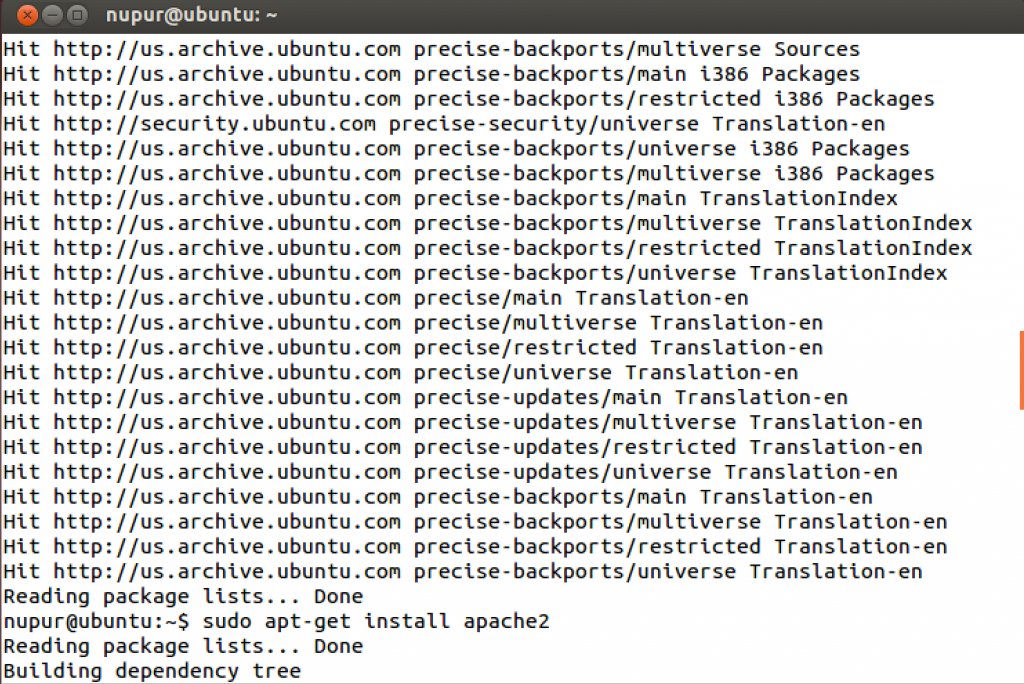
  Author : Nupur Bhatt           Open Ubuntu Terminal, enter the following commands :   Type sudo apt-get install apache2 to install Apache.   How to use open SSL for web server - browser communication.   How to use open SSL for web server - browser communication.   Step One—Activate the SSL Module The next step is to enable SSL on the droplet. Follow up by restarting Apache.   How to use open SSL for web server - browser communication.   Step Two—Create a New Directory We need to create a new directory where we will store the server key and certificate Step Three—Create a Self Signed SSL Certificate When we request a new certificate, we can specify how long the certificate should remain valid by changing the 365 to the number of days we prefer. As it stands this certificate will expire after one year.With this command, we will be both creating the self-signed SSL certificate and the server key that protects it, and placing both of them into the new directory. The most important line is "Common Name". Enter your official domain name here or, if you don't have one yet, your site's IP address. How to use open SSL for web server - browser communication.   Step Four—Set Up the Certificate To set up the virtual hosts to display the new certificate, open up the SSL config file: sudo nano /etc/apache2/sites-available/default-ssl. How to use open SSL for web server - browser communication.   Within the section that begins with <VirtualHost _default_:443>, quickly make the following changes. Add a line with your server name right below the Server Admin email: ServerName example.com:443 Replace example.com with your DNS approved domain name or server IP address (it should be the same as the common name on the certificate). Find the following three lines, and make sure that they match the extensions below: SSLEngine on SSLCertificateFile /etc/apache2/ssl/apache.crt SSLCertificateKeyFile /etc/apache2/ssl/apache.key Save and Exit out of the file. How to use open SSL for web server - browser communication.   Step Five—Activate the New Virtual Host Before the website that will come on the 443 port can be activated, we need to enable that Virtual Host: sudo a2ensite default-ssl Restarting your Apache server will reload it with all of your changes in place. sudo service apache2 reload   How to use open SSL for web server - browser communication.   In the browser, type https://127.0.0.1, and you will be able to see the new certificate. Click on Add Exception. Click on View certificate.   How to use open SSL for web server - browser communication.   How to use open SSL for web server - browser communication. How to use open SSL for web server - browser communication. How to use open SSL for web server - browser communication. How to use open SSL for web server - browser communication. How to use open SSL for web server - browser communication.
Comments ()


Sign in

Read Next

?Why Social and Emotional Skills Matter More Than ABCs in Early Years?

Blog banner

Computer security techniques

Blog banner

How social media affect

Blog banner

Routers

Blog banner

What makes Nugget RC Racing Florida’s Most Exciting Racing Events?

Blog banner

Uniprocessor Scheduling

Blog banner

The Power of Forensic Watermarking in the Fight Against Content Piracy

Blog banner

Components of GIS

Blog banner

How To Implement Search Engine Marketing (Sem) Strategy Effectively

Blog banner

GIS in Mapping and landslide alert in Bangladesh

Blog banner

Asana

Blog banner

Technological Advancement

Blog banner

KEAP MANAGEMENT SYSTEM

Blog banner

Modern operating system

Blog banner

Hey Aryan here

Blog banner

Pandas Matrix Applications

Blog banner

Kernel in Operating System

Blog banner

Deadlock

Blog banner

The Everyday Parenting Dilemma: Safety Vs Independence

Blog banner

IT security management

Blog banner

What is OS Fingerprinting?

Blog banner

IP Address

Blog banner

Concurrency management in operating systems

Blog banner

The functions of operating system

Blog banner

Electronic data interchange

Blog banner

Proton mail

Blog banner

Should you be using a mouthwash? Know from the experts

Blog banner

Linux 94

Blog banner

Smartphone Security: Vulnerabilities and Attacks

Blog banner

OS Assignment 3 Deadlock

Blog banner

memory management

Blog banner

Cache Memory

Blog banner

SECURITY VULNERABILITIES COUNTERMEASURES IN A SMART SHIP SYSTEM

Blog banner

Data is an asset and it is your responsibility!

Blog banner

IOT- Internet Of Things

Blog banner

Virtual memory in os

Blog banner

Self defence

Blog banner

INTERRUPTS

Blog banner

Blockchain in IoT Applications

Blog banner

Deadlocks in Operating Systems

Blog banner

STUDY OF SYSTEM HACKING TOOLS

Blog banner

HUBSPOT

Blog banner