Virtual memory is a critical feature of modern operating systems that allows a computer to compensate for shortages of physical memory (RAM) by temporarily transferring data from RAM to disk storage. This process creates the illusion that a computer has more RAM than it actually does.
How Virtual Memory Works:
1. Address Space Separation:
- Each program running on a computer is given its own virtual address space. This space is separate from the physical memory and from the address spaces of other programs. This means each program believes it has a continuous block of memory to work with, even if it's scattered across different parts of physical memory or on disk.
2. Paging:
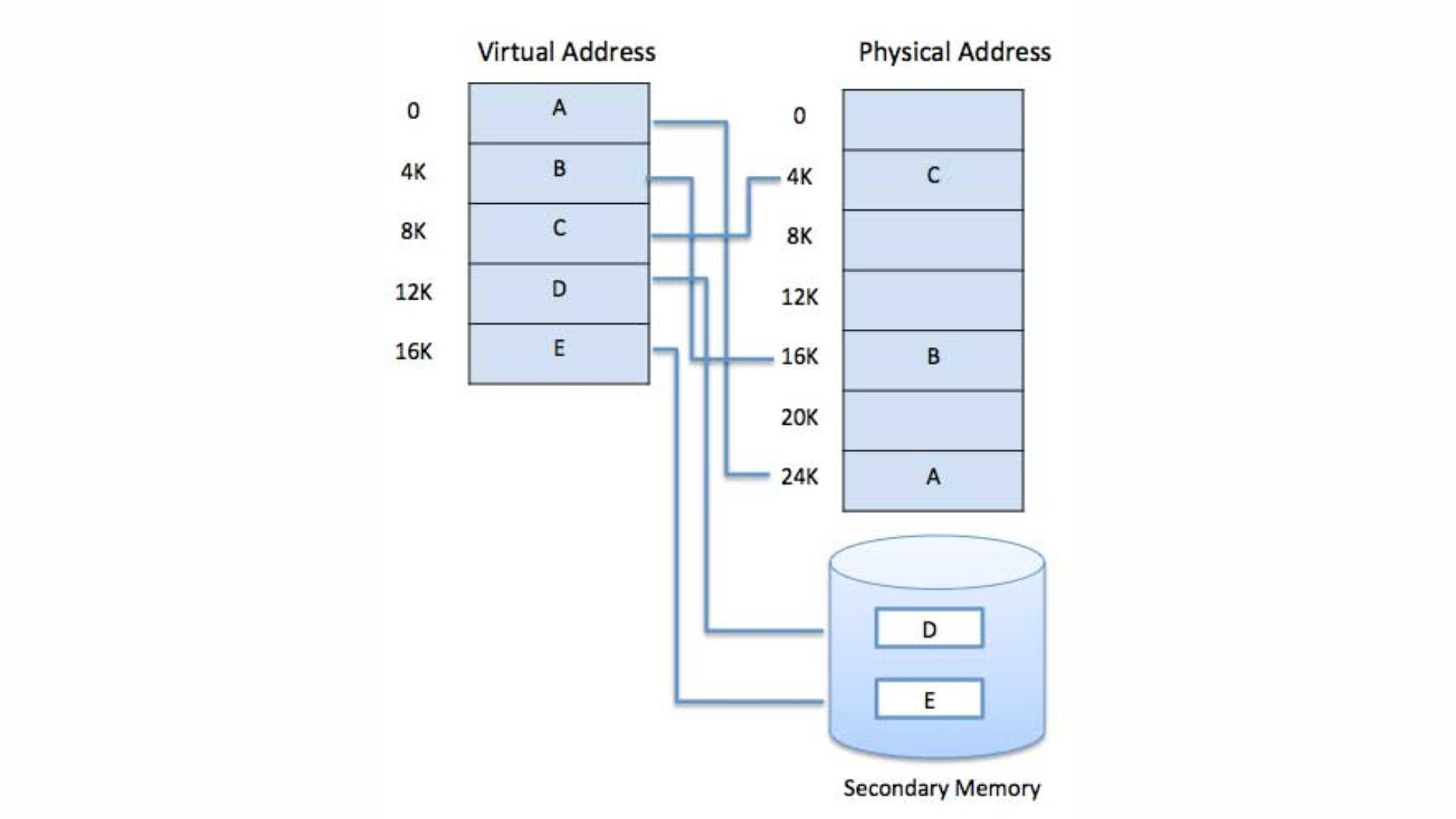
- Virtual memory divides both physical memory and virtual memory into fixed-size blocks called pages. Pages of the virtual address space are mapped onto physical memory frames. When a program tries to access a part of memory that is not currently in RAM (because it's stored on the disk), a page fault occurs, and the OS loads the required page from disk into RAM.
3. Page Tables:
- The OS maintains page tables that keep track of where each page of virtual memory is located in physical memory. These tables map virtual addresses to physical addresses, ensuring that the correct data is retrieved when a program needs it.
4. Swap Space:
- The portion of the hard drive or SSD used by the OS for virtual memory is called swap space. When RAM is full, the OS moves some pages from RAM to the swap space to free up memory for other tasks. If the data in swap space is needed again, it’s moved back into RAM, replacing other data that’s less important at the time.
5. Efficient Multitasking:
- Virtual memory allows multiple programs to run simultaneously without interfering with each other. Even if the physical memory is fully occupied, virtual memory enables the OS to keep programs running by swapping data in and out of the RAM as needed.
6. Memory Protection:
- Since each program operates within its own virtual address space, it cannot directly access the memory space of another program. This ensures better security and stability, preventing one faulty program from crashing the entire system.
Advantages of Virtual Memory:
- **Larger Memory Space:** Programs can use more memory than what's physically available in the system.
- **Memory Isolation:** Programs are isolated from each other, enhancing security and stability.
- **Efficient Resource Use:** Allows the OS to manage memory more effectively, making sure that RAM is used optimally.
Disadvantages of Virtual Memory:
- **Performance Impact:** Accessing data in the swap space on disk is slower than accessing data in RAM, which can slow down the system if the swap space is used excessively.
- **Disk Wear:** Constant swapping can lead to increased wear and tear on the storage device, particularly SSDs.