What is a Container?
A container is a application used to bundle up all the neccesary files, libraries and services into one runtime environment. As one unit, the container can easily be moved and run on any operating system in any context. They don’t contain a guest OS for each container and rely on the underlying OS kernel, which makes the containers lightweight.Containers share resources with other containers in the same host OS and provide OS-level process isolation.
Important Terminologies in Docker:
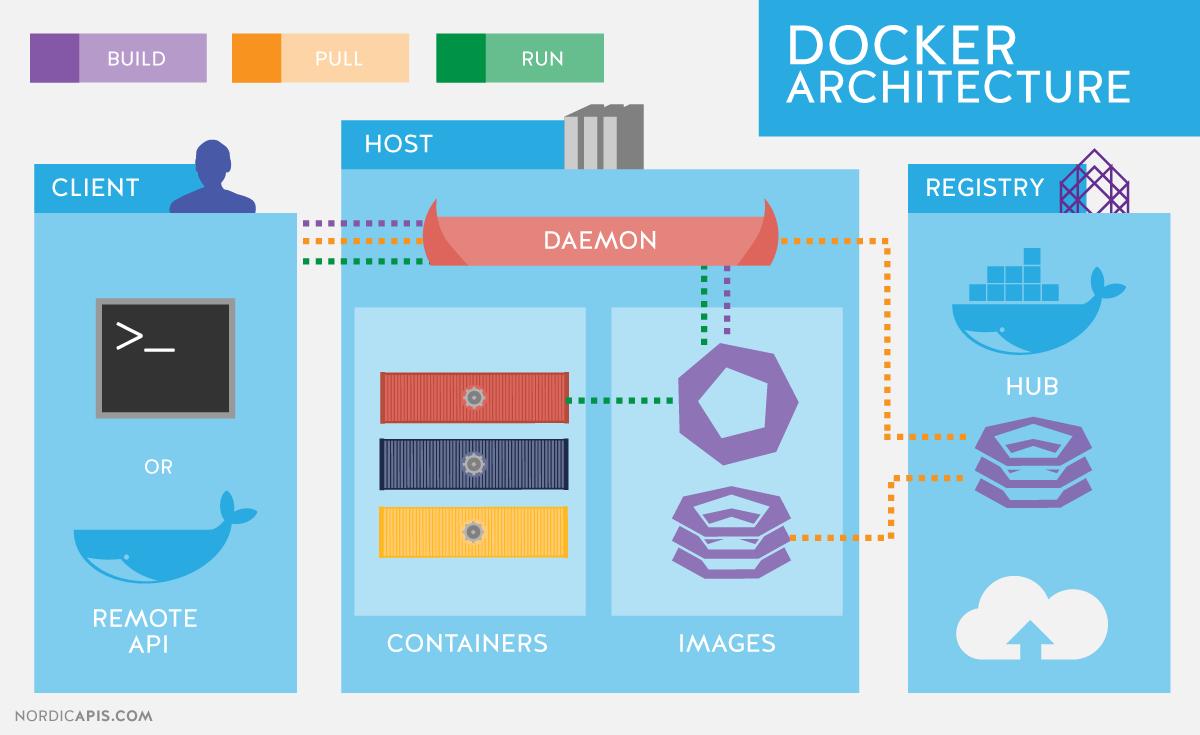
As the image shows, the important terminologies in a docker for it to run are;
Client, Host, Daemon, Registry, Containers and Images
A container is a runnable instance of an image. An image is a read-only template with instructions for creating a Docker container. Often, an image is based on another image, with some additional customization. A Docker registry stores Docker images. Docker Hub is a public registry that anyone can use, and Docker is configured to look for images on Docker Hub by default. You can even run your own private registry.
The Docker client is the primary way that many Docker users interact with Docker. When you use commands such as docker run, the client sends these commands to dockered, which carries them out. The docker command uses the Docker API. The Docker client can communicate with more than one daemon.The Docker daemon listens for Docker API requests and manages Docker objects such as images, containers, networks, and volumes. A daemon can also communicate with other daemons to manage Docker services.