Abstract : Malware is any malicious software designed to damage or exploit any programmable device, service, or network. Cybercriminals generally use it to extract data they can use to their advantage against victims in order to make money. The kinds of information that could be compromised include passwords, financial information, medical records, and personal correspondence, to name just a few.
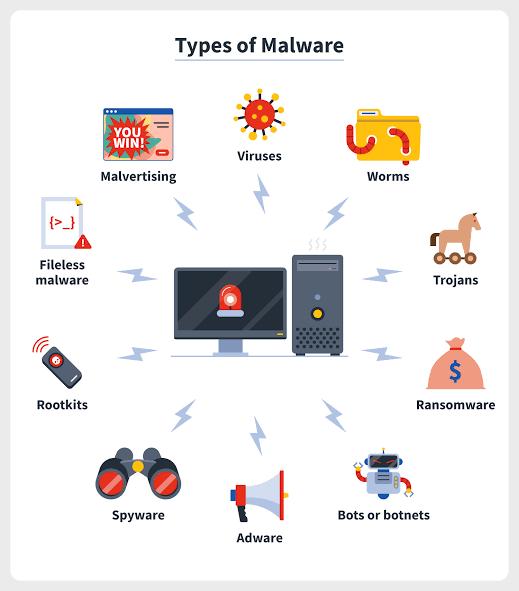
Introduction : Malware, short for malicious software, refers to any intrusive software developed by cybercriminals (often called hackers) to steal data and damage or destroy computers and computer systems. Examples of common malware include viruses, worms, Trojan viruses, spyware, adware, and ransomware.
Intent of malware
Intelligence and intrusion: Exfiltrates data such as emails, plans, and especially sensitive information like passwords.
Disruption and extortion: Locks up networks and PCs, making them unusable. If it holds your computer hostage for financial gain, it's called ransomware.
Destruction or vandalism: Destroys computer systems to damage your network infrastructure.
Steal computer resources: Uses your computing power to run botnets, cryptomining programs (cryptojacking), or send spam emails.
Monetary gain : Sells your organization's intellectual property on the dark web.
Types of malware
Virus
Viruses are a subgroup of malware. A virus is malicious software attached to a document or file that supports macros to execute its code and spread from host to host.
Example :
ILOVEYOU virus, 2000: This malware virus impacted millions of computers around the globe and was downloaded by clicking on an attachment called “LOVE-LETTER-FOR-YOU.TXT.vbs”
Worms
A worm is a type of malicious software that rapidly replicates and spreads to any device within the network. Unlike viruses, worms do not need host programs to disseminate.
Example :
SQL Slammer, 2003: Regarded as one the fastest spreading worm malware ever, SQL Slammer exploited a vulnerability in Microsoft’s SQL Server software.
Trojan virus
Trojan viruses are disguised as helpful software programs. But once the user downloads it, the Trojan virus can gain access to sensitive data and then modify, block, or delete the data.
Example :
ZeuS/Zbot, 2011: This banking Trojan leveraged keystroke logging to steal credentials and also account balances.
Spyware
Spyware is malicious software that runs secretly on a computer and reports back to a remote user. A specific type of spyware is a keylogger, which records your keystrokes to reveal passwords and personal information.
Example:
DarkHotel, 2014: This keylogger spyware targeted government and business leaders using hotel Wi-Fi.
Adware
Adware is malicious software used to collect data on your computer usage and provide appropriate advertisements to you.
Example:
Fireball, 2017: This adware infected around 250 million devices by means of browser hijacking to track victims’ web activity.
Ransomware
Ransomware is malicious software that gains access to sensitive information within a system, encrypts that information so that the user cannot access it, and then demands a financial payout for the data to be released.
Example:
WannaCry, 2017: This ransomware attack targeted thousands of computer systems around the world that were running Windows OS and spread itself within corporate networks globally.
Fileless malware
Fileless malware is a type of memory-resident malware. As the term suggests, it is malware that operates from a victim's computer's memory, not from files on the hard drive. Because there are no files to scan, it is harder to detect than traditional malware.
Example:
Astaroth, 2019: This fileless malware was a true info-stealer and primarily targetted Windows devices and in specific countries, including Brazil.
Malware protection
Conclusion
Malware is created to be intrusive or corruptive software on your computer network. Malware is designed to cause trouble and steal data or resources for financial gain or outright sabotage purposes. Businesses typically concentrate on preventative measures to halt breaches. Businesses presume they are secure by guarding the perimeter. But soon, some sophisticated malware will get inside your network. Deploying technologies that continuously monitor and identify malware that has gotten past perimeter security is therefore essential. modern network visibility and intelligence, together with many layers of protection, are necessary for adequate defense against modern malware.