What is Sniffing
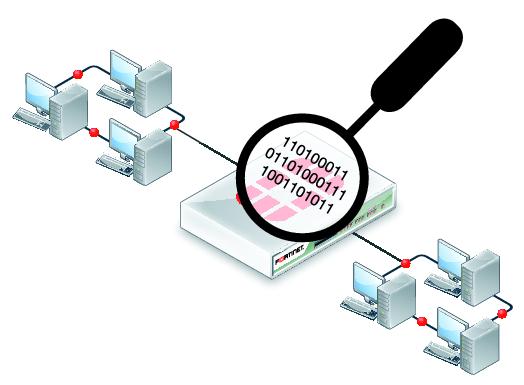
Sniffing is the process of scanning and monitoring of the captured data packets passing through a network using Sniffers. The process of sniffing is performed by using Promiscuous ports. By enabling promiscuous mode function on the connected network interface, allow capturing all traffic, even when traffic is not intended for them. Once the packet is captured, you can easily perform the inspection.
The attacker can intercept packets such as Syslog traffic, DNS traffic, Web traffic, email, and other types of data traffic that are travelling across the network by using sniffing. An attacker can obtain data, usernames, passwords, and other information by intercepting these packets from protocols like HTTP, POP, IMAP, SMTP, NMTP, FTP, Telnet, and Rlogin. Anyone connected to the target network or inside the same LAN can sniff the packets. Let's concentrate on how sniffers carry out their task and what we learn from sniffing.
There are two main types of sniffing
Passive sniffing: This is when the attacker does not interfere with the network traffic. They simply collect the data as it passes by.
Active sniffing: This is when the attacker actively modifies the network traffic. They may inject malicious packets or redirect traffic to their own devices.
Working of sniffers
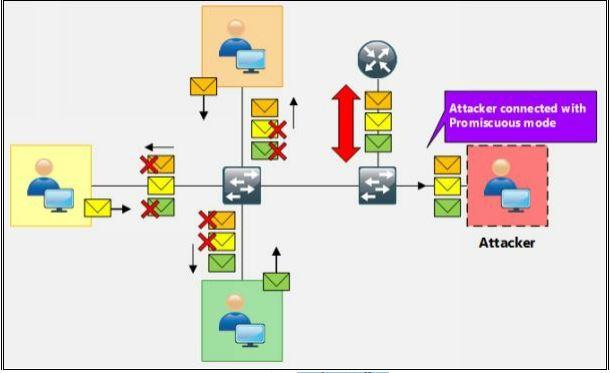
An attacker connects to the target network during sniffing in order to read the packets. The attacker captures the packet by using Sniffers, which places the Network Interface Card (NIC) of their system in promiscuous mode. The interface's promiscuous mode is a mode in which the NIC responds to each packet that it receives. The attacker is connected in promiscuous mode, as shown in the figure below, and accepts every packet, even those that are not meant for him. Once the packets have been captured, the attacker can decrypt them to retrieve data. The basic idea behind this strategy is that broadcast and multicast traffic is transmitted on all ports if you are linked to a target network using a switch rather than a hub. The unicast packet is forwarded by the switch to the precise port where the real host is connected. To confirm who is plugged onto which port, the switch maintains its MAC table. The attacker in this instance changes the switch configuration using various methods, including Port Mirroring or Switched Port Analyzer (SPAN). When an attacker connects to a port in promiscuous mode, all packets travelling through that port are duplicated onto that port. Whenever you are connected to a hub, all packets are sent to all ports.
There are various types of sniffing attacks. Here are some of the most common:
1. ARP Poisoning
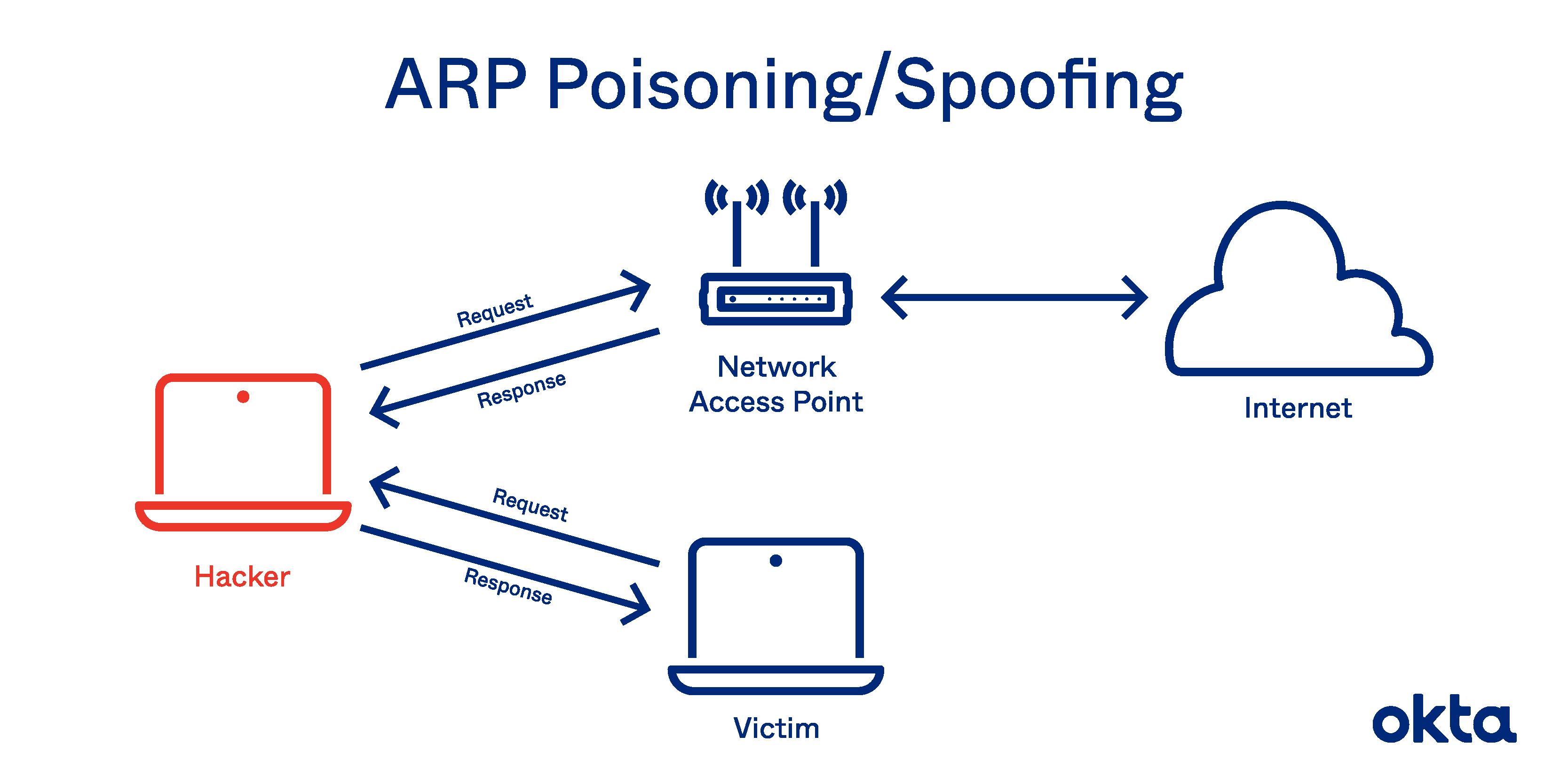
ARP poisoning is a type of cyberattack in which the attacker sends falsified Address Resolution Protocol (ARP) messages over a network. These messages trick devices on the network into thinking that the attacker's computer has the IP address of a legitimate device, such as a router or gateway. This allows the attacker to intercept traffic between the victim's computer and the legitimate device.ARP poisoning can be used to steal sensitive information, such as passwords and credit card numbers, or to launch denial-of-service attacks.To carry out an ARP poisoning attack, the attacker must first be able to see the ARP traffic on the network. This can be done by connecting to the network as a legitimate device or by using a wireless sniffer.
To carry out an ARP poisoning attack, the attacker must first be able to see the ARP traffic on the network. This can be done by connecting to the network as a legitimate device or by using a wireless sniffer.Once the attacker has access to the ARP traffic, they can send spoofed ARP messages to the victim's computer. These messages will tell the victim's computer that the attacker's computer has the IP address of the legitimate device.
When the victim's computer sends traffic to the legitimate device, the traffic will be sent to the attacker's computer instead. This allows the attacker to intercept the traffic and read it.ARP poisoning can be prevented by using a firewall or by using a network security solution that can detect and block ARP spoofing attacks.
2. DNS Spoofing
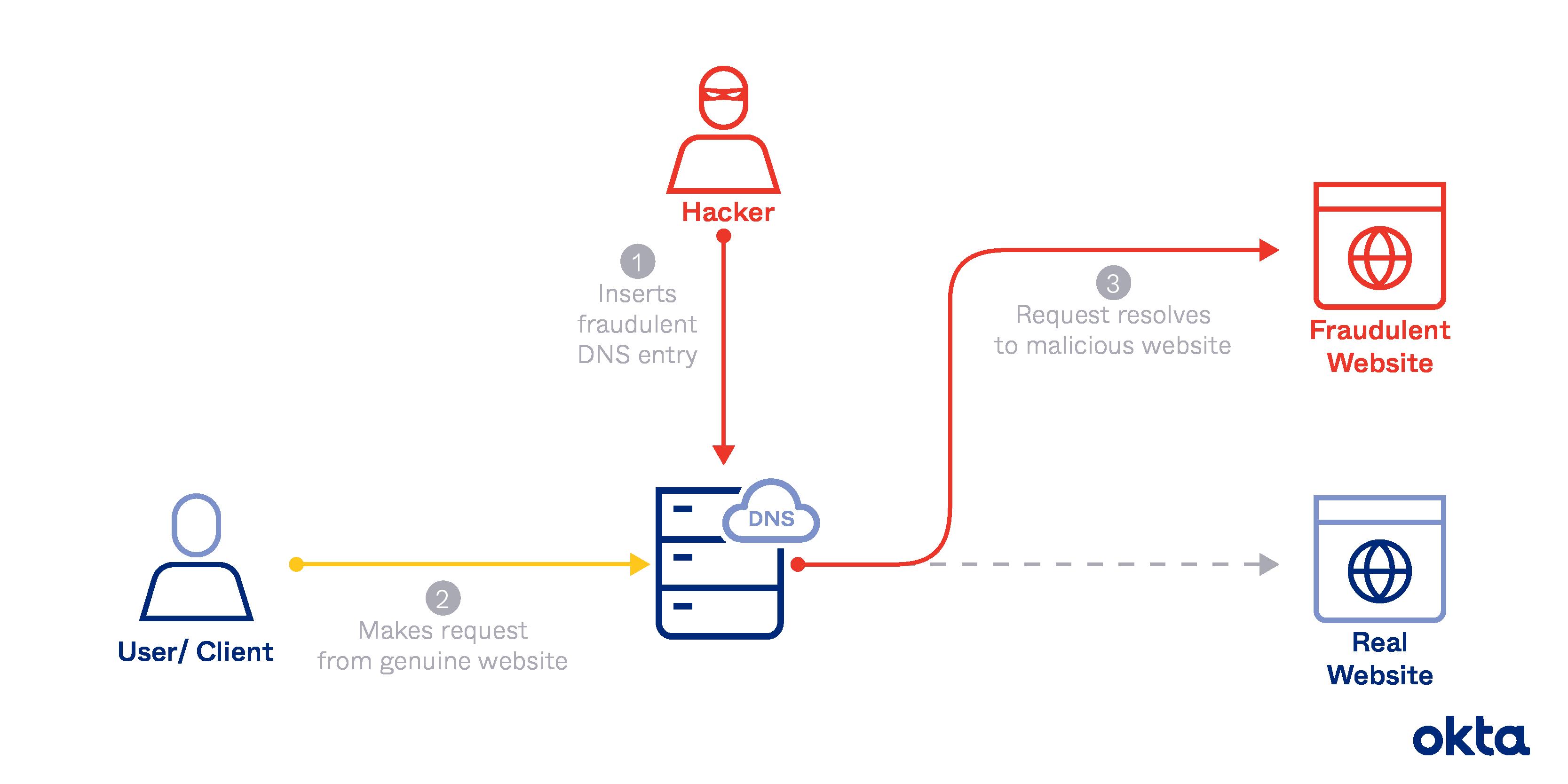
DNS spoofing is a type of cyberattack in which the attacker sends falsified Domain Name System (DNS) messages over a network. These messages trick devices on the network into thinking that the attacker's computer is the DNS server. This allows the attacker to redirect traffic to their own servers.DNS spoofing can be used to steal sensitive information, such as passwords and credit card numbers, or to launch denial-of-service attacks.To carry out a DNS spoofing attack, the attacker must first be able to see the DNS traffic on the network. This can be done by connecting to the network as a legitimate device or by using a wireless sniffer.
Once the attacker has access to the DNS traffic, they can send spoofed DNS messages to the victim's computer. These messages will tell the victim's computer that the attacker's computer is the DNS server.When the victim's computer tries to resolve a domain name, it will send a DNS query to the attacker's computer. The attacker's computer will then return a spoofed DNS response that points to the attacker's own servers.When the victim's computer tries to connect to the domain name, it will be redirected to the attacker's servers. This allows the attacker to intercept the traffic and read it.
DNS spoofing can be prevented by using a firewall or by using a network security solution that can detect and block DNS spoofing attacks.
3. LAN Sniffing
LAN Sniffing is the process of intercepting and monitoring network traffic on a local area network (LAN). This can be done by connecting a sniffer to a network switch or by installing a sniffer on a computer that is connected to the network. Once the sniffer is in place, it can capture all of the data that passes through the network.
LAN sniffing can be used for a variety of purposes, such as:
Identifying unauthorized users: Sniffers can be used to identify unauthorized users who are accessing the network. This information can be used to block these users from accessing the network or to take other action.
Detecting malware: Sniffers can be used to detect malware that is being transmitted over the network. This information can be used to remove the malware from the network or to prevent it from spreading.
Gathering intelligence: Sniffers can be used to gather intelligence about the network, such as the types of devices that are connected to the network and the types of traffic that is being transmitted. This information can be used to improve the security of the network or to identify potential threats.
There are a number of ways to prevent LAN sniffing, including:
Encrypt your network traffic: This will make it more difficult for attackers to read the data.
Use a firewall: A firewall can block unauthorized access to the network.
Use intrusion detection systems (IDS): An IDS can detect and alert you to suspicious network activity.
Keep your software up to date: Software updates often include security patches that can help to protect you from LAN sniffing attacks.
Use a VPN: A VPN can encrypt your traffic and make it more difficult for attackers to sniff it.
Here are some of the most common tools used for LAN sniffing
Wireshark: Wireshark is a free and open-source network packet analyzer. It can be used to capture and analyze network traffic on a variety of platforms.
tcpdump: tcpdump is a command-line packet analyzer. It is available for Linux and macOS.
Ngrep: Ngrep is a network grep tool. It can be used to search for specific patterns in network traffic.
Snort: Snort is an intrusion detection system (IDS). It can be used to detect and alert you to suspicious network activity.
Zeusmap: Zeusmap is a network mapper. It can be used to map out your network and identify potential security vulnerabilities.
4. Session Hijacking
This is a type of active sniffing attack. In session hijacking, the attacker steals the session ID of a legitimate user. This allows the attacker to impersonate the legitimate user and access their data.
5. Wi-Fi Sniffing
This is a type of sniffing attack that is specifically designed to capture traffic on wireless networks. Wi-Fi sniffing is often easier than sniffing on wired networks because the signal is not as well protected.
6. Packet Injection
This is a type of active sniffing attack in which the attacker injects malicious packets into the network traffic. These packets can be used to steal data, launch denial-of-service attacks, or even take control of systems.
7. Man-in-the-middle attack
This is a type of attack in which the attacker positions themselves between two legitimate users. The attacker can then intercept and read all of the traffic that is sent between the two users.
These are just some of the most common types of sniffing attacks. There are many other types of attacks, and new ones are being developed all the time. It is important to be aware of the risks of sniffing attacks and to take steps to protect yourself from these attacks.
conclusion
Sniffing is a serious security threat that can have a significant impact on businesses and individuals. By understanding how sniffing works and how to prevent it, you can help to protect your network from these attacks.