wisemonkeys logo
FeedNotificationProfileManage Forms
FeedNotificationSearchSign in
wisemonkeys logo

Blogs

Virtual memory in windows

profile
Nish Patel
Aug 14, 2024
0 Likes
0 Discussions
87 Reads

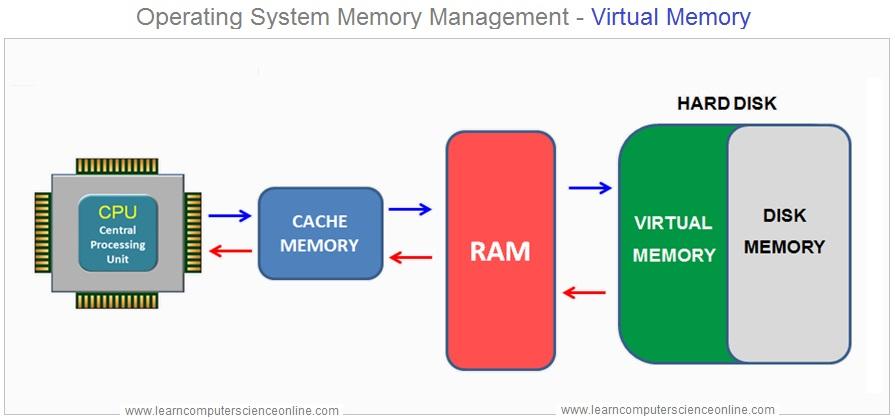
Windows Virtual Memory is a system component that allows your computer to compensate for physical memory (RAM) shortages by temporarily transferring data from RAM to a space on the hard drive or SSD, known as the **page file** or **swap file**. This process enables your computer to handle larger workloads and run more applications simultaneously than it could with just physical RAM.


How Virtual Memory Works:

1. Page File : When the physical RAM is full, Windows moves some data that hasn't been used recently from RAM to the page file. This frees up RAM for other tasks.

2. Paging : The process of moving data between RAM and the page file is called "paging." Windows uses a technique called "demand paging," where data is only moved when needed.


3. Performance Impact : Accessing data in virtual memory (page file) is slower than accessing data in physical RAM because hard drives and SSDs are slower than RAM. Therefore, excessive reliance on virtual memory can slow down your system.


4. Configuration : By default, Windows automatically manages the size of the page file, but users can also configure it manually based on their needs.


Importance:

- Prevents Crashes : Virtual memory helps prevent system crashes by ensuring that the system doesn't run out of memory.

- Running Large Applications : It enables the running of large applications or multiple applications simultaneously without being constrained by the amount of physical RAM.

- Memory Management : Efficiently manages system memory to maintain performance.


In summary, Windows Virtual Memory is an essential component that extends the effective amount of memory available to the system, though at a cost in performance when it is heavily used.



Comments ()


Sign in

Read Next

Threads

Blog banner

How to Encrypt and Decrypt Using GNU PGP

Blog banner

DIGITAL TECHNOLOGY

Blog banner

5 Powerful Mindset Shifts To Make 2026 Your Breakthrough Year

Blog banner

Virtual memory

Blog banner

Topic: Sessions in Operating system

Blog banner

AI & Data Science in Healthcare – Predicting diseases, medical imaging analysis

Blog banner

Cyber Security in Data Breaching

Blog banner

IT security management

Blog banner

Blockchain in IoT Applications

Blog banner

Kernel Memory Allocation In Linux.

Blog banner

What is Spyware?

Blog banner

PROCESS STATES OF OPERATING SYSTEM

Blog banner

Go Daddy

Blog banner

How to Compare Schools Before an Admission Decision

Blog banner

Top 4 Places To Stay In Copenhagen

Blog banner

Sleep Matters: The Science Behind Toddler Naps

Blog banner

Improving defences Proxy Device(defense in depth)

Blog banner

Top 5 Places To Stay And Visit In Berlin, Germany

Blog banner

Service Operations in ITSM

Blog banner

Privacy LAWs in IT

Blog banner

Exploring Human Factors in Cyber Forensics Investigations.

Blog banner

The War With Cold On Earth

Blog banner

Top 3 Places To Stay In Vienna

Blog banner

MENDELEY

Blog banner

Memory Management

Blog banner

Sage

Blog banner

GOOGLE

Blog banner

Virtual memory

Blog banner

Web Site

Blog banner

Concurrency management in operating systems

Blog banner

Multiprocessor and Multicore Organization

Blog banner

Shoulders

Blog banner

What is 'Multi-core and Multi-threading' ?

Blog banner

Music helps reduce stress

Blog banner

Functions Of Operating Systems

Blog banner

Deadlock in operating system

Blog banner

VIRTUAL MACHINES

Blog banner

Mail merge

Blog banner

Importance of Morning Routines for Students During the Festive Season

Blog banner

Travel Geek ‘The last $50k in Switzerland’

Blog banner

Culture Of Ladakh

Blog banner