Safe Wifi Practice: Understanding VPN
In today's digital age, the internet has become an essential part of our lives. We use it for work, entertainment, and communication. However, with the convenience of the internet comes the risk of cyber threats. One of the most significant risks is the use of public Wi-Fi networks. Public Wi-Fi networks are often unsecured, making them an easy target for cybercriminals to intercept data and steal personal information. One way to protect yourself while using public Wi-Fi is by using a Virtual Private Network (VPN).
What is a VPN?
A VPN, or Virtual Private Network, is a service that creates a secure and encrypted connection between your device and the internet. It works by routing your internet traffic through a remote server and encrypting it, making it difficult for anyone to intercept or steal your data. VPNs are commonly used to protect online privacy, bypass internet censorship, and access geo-restricted content.
Advantages of using a VPN:
Secure connection from anywhere: VPNs give secure access to the internet, no matter where you are. Even if you're using public Wi-Fi, all of your outgoing and incoming traffic is secure and anonymous.
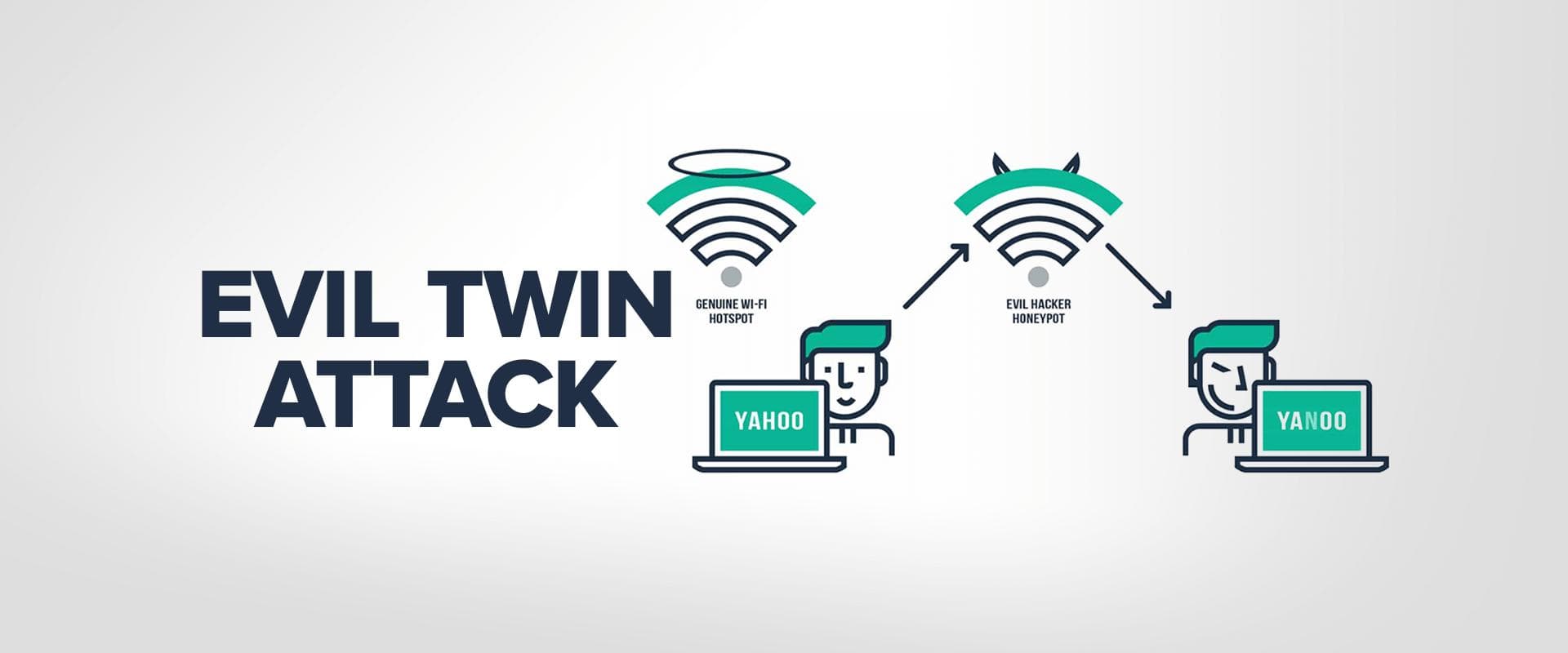
Extra layer against hackers: Cybercriminals will try to intercept traffic and steal your data using techniques such as man-in-the-middle attacks. By using a VPN, you safeguard yourself from this kind of hack.
Privacy protection: VPNs encrypt your internet traffic, making it difficult for anyone to spy on your online activities.
Access to geo-restricted content: VPNs allow you to access content that may be restricted in your region, such as streaming services or websites.
Disadvantages of using a VPN:
Slower internet speed: Since your internet traffic is routed through a remote server, it can slow down your internet speed.
Cost: While some VPNs are free, most require a subscription fee.
Configuration: Setting up a VPN can be complicated, and if not configured correctly, it can result in leaks that can compromise your privacy.
How to use a VPN:
Choose a reputable VPN provider: There are many VPN providers available, but not all of them are trustworthy. Do your research and choose a provider that has a good reputation for security and privacy.
Install the VPN software: Once you've chosen a provider, download and install the VPN software on your device.
Connect to a VPN server: Open the VPN software and connect to a server. The server location you choose will determine your virtual location and IP address.
Start browsing: Once you're connected to the VPN server, you can start browsing the internet securely and anonymously.
Why use a VPN on public Wi-Fi?
Public Wi-Fi networks are often unsecured, making them an easy target for cybercriminals to intercept data and steal personal information. By using a VPN on public Wi-Fi, you can protect yourself from these threats. A VPN encrypts your internet traffic, making it difficult for anyone to intercept or steal your data. It also hides your IP address, making it difficult for anyone to track your online activities.
Choosing a VPN provider:
When choosing a VPN provider, it's essential to do your research and choose a provider that has a good reputation for security and privacy. Look for a provider that offers strong encryption, a no-logs policy, and a variety of server locations. It's also important to choose a provider that offers good customer support and easy-to-use software.
Configuring your VPN:
Setting up a VPN can be complicated, and if not configured correctly, it can result in leaks that can compromise your privacy. It's important to follow the instructions provided by your VPN provider carefully. Make sure that your VPN is set to use the strongest encryption available and that it's configured to use the correct protocol for your device.
VPN and Token Limits:
When using a VPN, it's important to be aware of token limits. Tokens are a way of measuring the amount of data that can be processed by an AI model. Many VPNs use AI models to encrypt and decrypt data and these models have token limits. If you exceed the token limit, your VPN may stop working correctly.
To avoid token limits, it's important to choose a VPN provider that uses AI models with high token limits. You should also be aware of the token limits for the AI models used by your VPN provider and adjust your usage accordingly.
Conclusion:
Using a VPN is an effective way to protect yourself while using public Wi-Fi networks. It provides an extra layer of security against cyber threats and protects your online privacy. While there are some disadvantages to using a VPN, the benefits outweigh the drawbacks. It's essential to choose a reputable VPN provider and configure it correctly to ensure maximum protection. By following these steps, you can use a VPN to stay safe and secure while browsing the internet.