 AUTHOR : Nupur Bhatt
AIM : To provide an overview of the various AIS & ANN based malware detection techniques used in Android OS.
Abstract :
AUTHOR : Nupur Bhatt
AIM : To provide an overview of the various AIS & ANN based malware detection techniques used in Android OS.
Abstract : The rise in the use of Android Operating Systems among smartphone users has also led to the increase of malware found in them. Various techniques used for detection of malware will be discussed in this paper, with a brief overview of Artificial Immune System and Artificial Neural Network based solution for malware detection as given by S. Bezobrazov, A. Sachenko, M. Komar,
- Rubanau / International Journal of Computing, 15(3) 2016, 184-190 in “The Methods Of Artificial Intelligence For Malicious Applications Detection In Android OS”.
Keywords : Android, Artificial Intelligence, Artificial Neural Networks, Artificial Immune Systems, Malware, Malware Detection, Cyber Security.
INTRODUCTION
The Android OS is the most popular operating system among smartphone users.[1]The proliferation of the Android Operating System is impressive, with 2.1 billion smartphone users having used it in 2016[2] and a whooping 2.4 billion estimated users in 2017[3][4]. Android OS has the largest market share in the world.
Android is an open source mobile operating system developed by Google based on a Linux Kernel. Android applications are written in the Java programming language using and IDE and SDK(Software Development Kit). The Android Runtime[5] is an application runtime environment and the next version of the Dalvik Virtual Machine used to run .apk files that constitute and android application. Application Package Kit (APK) format is used by the android applications for distribution and installation of apps.
The ART runs multiple virtual machines by executing DEX files that is a byte code format designed for Android.[5]
Security Features like Android Application Sandbox[6] isolates the app data and code execution from other apps. Application-defined permissions allow to control application data on a per-app basis.[6]
App Components in android consists of Activities, Services, Broadcast Receivers and Content Providers. Activities[7] are the app screens with a user interface that the user interacts with. Services[7] keep the app running in the background for various reasons. Broadcast Receivers[7] allows the android system to deliver events to the app. Content Providers[7] manage data sets stored in a file, SQLite database or any persistent storage solution.
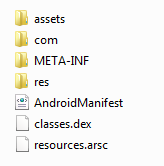
Fig. 1 - The structure of APK file
The Manifest File (AndroidManifest.xml) is a declaration of all the app components, permissions, API Levels, hardware or software features and most important, the linked libraries.
Permissions restrict access to code or data on the device. To maintain security for the system and users, Android requires apps to request permission before the apps can use certain system data and features.[8] Permissions are Normal and Dangerous. Dangerous permissions require to ask for permissions from the user when the app is installed, explicitly. Normal permissions on the other hand cannot be denied by the user and are granted automatically. In Android 6.0(API Level 23) users grant permissions to apps while the app is running[10], not when they install or update the app, giving the user more control over the app’s functionality. Users can also revoke the permissions by changing the app settings.
Examples of Normal Permissions : android.permission.ACCESS_NETWORK_STATE android.permission.BLUETOOTH android.permission.ACCESS_WIFI_STATE android.permission.INTERNET
Examples of Dangerous Permissions : android.permission.ACCESS_COARSE_LOCATION android.permission.ACCESS_FINE_LOCATION android.permission.SEND_SMS android.permission.WRITE_EXTERNAL_STORAGE
Permissions play an important role in the security of android applications and can be extracted from the manifest file of an application.
The Google Play Store is the official marketplace for android apps, and contains apps developed by Google or other third party developers. Other third-party marketplaces include the Amazon App Store for Android, AppsLib, Mobogenie, Itch.io and others which may contain apps embedded with malicious code.
Malware is malicious software written to exploit vulnerabilities found in a system.
Due to the proliferation of android devices, malware found in the android OS has increased since 2010. Mohd Zaki et al. (2014) have compared the studies by Felt et al. (2011) and Pieterse and Oliver(2012) and have listed the following malicious intentions[11] :
Stealing device and user credential information: Most of the Android malware are collecting information regarding International Mobile Equipment Identity (IMEI) number, International Mobile Subscriber Identity (IMSI) number, GPS Location, Phone number, SDK version and Installed package. Android malware also captured user activities such as SMS send or received and call out or in duration.
Draining resources: Android malware application can executed a malicious payload that can utilise all the disk storage or memory (RAM) quotas and hogging the CPU.
Communicate with Command and Control (C and C) server: Android malware have the intention to communicate to a C and C server similar to Botnet. Communication can be made through HTTP or SMS. This connection are made for sending captured information from the device and also for updating the malware package or receiving any other malicious information for instance SMS premium number or any other malicious URL.
Malware can also be used to blackmail for ransom. For example, the WannaCry Ransomware attacks were a worldwide cyberattacks by the WannaCry ransomware crypto-worm. Hence, the detection of malware becomes a necessity. Various malware detection techniques include[12] :
Signature based detection : Signatures are binary pattern characteristics of malicious code that identify a particular virus. Antivirus softwares maintain a database of virus signatures and check files for the presence of any virus signatures. However, this method does not work on polymorphic and metamorphic malware.
Anomaly-based detection : Anomaly-based detection usually occurs in two phases–the training (learning) phase and the detection (monitoring) phase. During the training phase, the detector attempts to learn the normal behaviour to use this information to differentiate between the normal behaviour and harmful one. A key advantage of anomaly-based detection is its ability to detect zero- day attacks. Zero-day attacks are attacks that are previously unknown to the malware detector.
The two fundamental limitations of this technique are its high false alarm rate and the complexity involved in determining what features should be learned in the training phase.
The problem with these techniques is that they do not respond to unidentified threats.
The implementation of Artificial Intelligence in Malware detection techniques yields much better results. Sergie et al.(2016)[13] classified these as follows :
Immunity-based Methods : M. Zhao et al. proposed a theoretical framework to obtain and analyze smartphone application activity in Android environment. In collaboration with the Android user community, it will be capable of distinguishing between benign and malicious applications of the same name and version, detecting anomalous behavior of known applications. The authors have chosen artificial immunology algorithm to distinguish between benign applications and their corresponded malware version.
Permission-based Methods : Felt et al. performed studies to examine where they indicated that current Android permission warnings do not help most users make correct security decision. The authors developed the tool named ‘Stowaway’ , that applies static analysis on the collected sample applications, and then they map the permission with each operation. The aim of this is to detect over-privileged permissions in Android applications.
Behaviour-based Methods : T. Blasing et al. developed an Android emulator ‘Android Application Sandbox’. This tool logs the time of execution, the name of the system call and the IDs of the processes. Based on the collected information the tool makes the decision that the application is malicious or benign.
STUDY
Artificial Immune Systems are machine learning systems based on the functions of the Human Immune System.The artificial immune network is an Immune Network Algorithm inspired by the field of Artificial Immune Systems. Sergie et al.(2016)[13] presented the “Intelligent Cyber Defence System” [14]-[16] that was based on the integration of artificial immune networks and artificial immune system methods. Figure 2 shows the architecture of the system.
The Defence system consisted of a set of immune detectors having a time period called
lifetime during which the detector goes through stages like creation, training, selection and detection. These are intelligent immune detectors with each detector based on a neural network.
The first phase as shown in Fig.2 produces immature detectors, which learn correct classification of objects and detection of malicious code in the training stage with the help of the training data, generated each time the system extracts data from applications when installed. The selection stage checks the correctness of the detectors by prompting them to classify objects as either malign or benign. Detectors not capable of classifying objects correctly are replaced by new ones. For example, if an object classifies a benign objects as malicious, it is replaced by a new detector, which increases the rate of false alarms.Malign applications are blocked. The detector after going through all these phases and correctly classifying objects is transformed into an immune memory detector which analyses the source of files(executables) or network traffic.
The mechanism of updating the training data evolves the system. The main component of the system is the immune detector which is a neural network. The system worked flawlessly for malicious code detection and network intrusion detection. They then used the same approach for Android Malware detection.
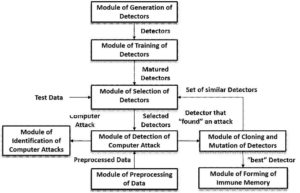
Fig. 2 - Architecture of the Intelligent Cyber Defence System[13]
For the Android Malware Detection, they proposed a Feed Forward counter propagation neural network that guarantees finding the correct weights during the learning process.
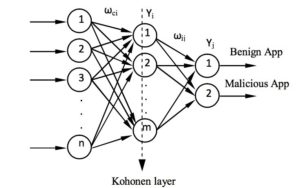 Fig. 3 - The structure of Neuronet immune detector[13]
Figure 3 shows the structure of the immune detector neural network called the Neuronet, which consists of three layers of nodes. The Input, Hidden and Output layer. Input layer nodes connect to each node in the hidden layer and receive data from outside, data being the set of Android system permissions that will allow the analysis of the behaviour of applications and classify them as malign or benign. The number of input nodes
n equals the size of the input vector. The Hidden layer consists of Kohonen neurons, which are a type of neural network that perform clustering, also known as a knet or a self-organizing map. This type of network can be used to cluster the dataset into distinct groups when you don't know what those groups are at the beginning. The Output layer maps clusters into classes malign or benign. Detectors can now classify real-world patterns after training.
ANALYSIS
Each application manifest files contains the set of permissions used in that particular application. A binary vector can be created which represents information about the set of permissions used and permissions not used in the application. The 152 permissions form the training set. During the training stage each immune detector is trained by the training set consisting of permissions.
Sergie et al.(2016)[13] conducted experiments by collecting malign and benign applications from different sources. Permissions of both were extracted and vectors were created, dividing them into two sets - training and testing. The immune detectors were trained by both malign and benign sets of data and test data was checked. Results showed immune detectors correctly classifying unknown and known applications from training set.
The proposed system is robust and anticipates threats based on permissions which prompts the following questions to arise :
- Normal permissions in some cases are necessary to an application, and android system grants the permission automatically. For Example, a permission like android.permission.ACCESS_NETWORK_STATE and android.permission.ACCESS_WIFI_STATE are used in social media applications to check-in places. Malicious apps can use it to spot available network connections to download malware or send text messages without your knowledge.
- Following API Level 23 (Marshmallow), users can assign and revoke access to dangerous permissions during runtime, which may prompt a naive user to allow seemingly innocent permissions to exploit the system with hidden malware.
- Robustness against Dvmap Malware founded by Kapersky that injects malicious code into System Files, accomplished through clever hiding of files and use of encryption.
CONCLUSION
Smartphones are vulnerable to malware due to flexible communication and third party developers. To provide well rounded protection, a collection of systems implementing various techniques in a synergy would yield remarkable results. The defence system needs to cope with the evolving android platform, to meet the user needs.
REFERENCES
[1] Pawal Piejko, Device Atlas :
https://deviceatlas.com/blog/17-mobile-market-statistics-you- should-know-2017.
[2] Greg Sterling, Marketing Land :
http://marketingland.com/android-now-dominant-os- around-globe-surpassing-windows-211024,2017.
[3] David Murphy, Mobile Marketing :
http://mobilemarketingmagazine.com/24bn-smartphone- users-in-2017-says-emarketer, 2017.
[4] eMarketer Benchmarks :
https://benchmarks.emarketer.com/channel/ 58fe47a2d2670009840a9ec7/58dd63dd2357af0c900b4d33.
[5] Platform Architecture :
https://developer.android.com/guide/platform/index.html
[6] Security Tips :
https://developer.android.com/training/articles/security-tips.html
[7] Application Fundamentals :
https://developer.android.com/guide/components/ fundamentals.html
[8] System Permissions :
https://developer.android.com/guide/topics/permissions/index.html
[9] Permission List :
https://developer.android.com/reference/android/Manifest.permission.html
[10] Requesting Permissions at Runtime :
https://developer.android.com/training/permissions/ requesting.html
[11] Mohd Zaki Mas`ud, Shahrin Sahib, Mohd Faizal Abdollah, Siti Rahayu Selamat and Robiah Yusof, 2014. Android Malware Detection System Classification. Research Journal of Information Technology, 6: 325-341.
[12] Mohamed Ahmed, Mohamed Ali and Mohd Aizaini Maarof in “Malware Detection Techniques Using Artificial Immune System”. Lecture Notes in Electrical Engineering, July 2011.
[13] S. Bezobrazov, A. Sachenko, M. Komar, V. Rubanau / International Journal of Computing, 15(3) 2016, 184-190 in “The Methods Of Artificial Intelligence For Malicious Applications Detection In Android OS”.
[14] S. Bezobrazov, and V. Golovko, “Artificial immune systems of the neural network for the malicious code detection,” in
Proceedings of the 6th International Conference on Neural Networks and Artificial Intelligence (ICNNAI’2010), Brest, Belarus, 2010.
[15] M. Komar, V. Golovko, A. Sachenko and S. Bezobrazov, “Intelligent system for detection of networking intrusion,” in Proceedings of the 6th IEEE International Conference on Intelligent Data Acquisition and Advanced Computing System (IDAACS’2011), Prague, Czech Republic, 15-17 September 2011, pp. 374-377.
[16] V. Golovko, S. Bezobrazov, V. Melianchuk and M. Komar, “Evolution of immune detectors in intelligent security system for malware detection,” in
Proceedings of the 6th IEEE International Conference on Intelligent Data Acquisition and Advanced Computing System (IDAACS’2011), Prague, Czech Republic, 15-17 September 2011, pp. 722-726.