The processor is defined as a logic circuit or simple chip which reacts to fundamental instructions and input processes to operate the computer. The important purposes of a processor are getting, decoding, processing, executing and writing back as feedback to the instructions of the chip. The processor is termed as the brain of any electronic systems that incorporate into a laptop, computers, smartphones, and embedded systems. The control unit and arithmetic logic unit are the two significant components of the processors.
Every computer has a processor and the processor is the brain of the computer. Intel Core processors are among the best you can buy, but choosing which of the 3 (i3, i5 and i7) different models best suits your needs can be confusing. Generally speaking, a Core i3, i5 or i7 that has a newer architecture is faster than the older-architecture processor that it replaces.
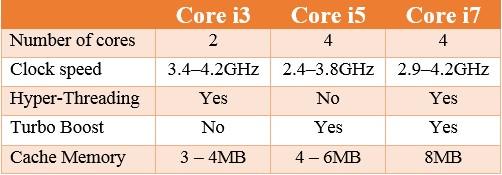
Intel's current core processors are divided into three ranges; Intel Core i3, Intel Core i5 and Intel Core i7. Different processor families have different characteristics that determine their levels of efficiency. The more cores there are, the more tasks (known as threads) can be served at the same time. But, Core i7 does not have seven cores nor does Core i3 have three cores. The numbers are simply indicative of their relative processing powers. Their relative levels of processing power are based on a collection of criteria involving their number of cores, clock speed (in GHz), size of cache, as well as some new Intel technologies like Turbo Boost and Hyper-Threading. Therefore, let's break down these concepts to understand them better.
A core is usually the basic computation unit of the CPU. It receives instructions and performs calculations, or actions, based on those instructions. Literally everything you do on your computer has to be processed by your processor. A processor with two cores is called a dual-core processor and four cores is called a quad-core processor. For example, an i5 4690k has 4 cores. Currently, an 18-core processor is the best you can get in consumer PCs. Each "core" is the part of the chip that does the processing work. Essentially, each core itself is a processor technically.
The clock speed is the most common way to measure a CPU's speed. The CPU requires a fixed number of clock ticks, or cycles, to execute each instruction. The CPU speed determines how many calculations it can perform in one second of time.
Clocks speed are measured (in very basic increments) in Hertz, abbreviated as Hz. One Hz means once a second. 1000 Hz is 1 KHz. 1000 KHz is 1 MHz. 1000 MHz is 1 GHz, which is the standard measurement for processors today. So, if your CPU has a 3.5 GHz clock, that means that every second, it is capable of performing 3,500,000,000 instruction sets per second. The highest clock cycles on processors available today is around 4 GHz. If you double the speed of the clock, leaving all other hardware unchanged, you will not necessarily double the processing speed. The other components like RAM, hard drive, motherboard, and the number of processor cores (e.g., dual core or quad core) are also have to upgrade for improve the computer speed.
Intel's implementation of Simultaneous Multi-Threading is known as Hyper-Threading Technology, or HT Technology. It is where your processor pretends to have 2 physical processor cores, yet only has 1 and some extra junk. It's available on Core i7 and Core i3 , but not on the mid-range core i5.
Hyper-Threading Technology uses processor resources more efficiently, enabling multiple threads to run on each core. As a performance feature, it also increases processor throughput, improving overall performance on threaded software. The point of hyperthreading is that many times when you are executing code in the processor, there are parts of the processor that is idle. By including an extra set of CPU registers, the processor can act like it has two cores and thus use all parts of the processor in parallel. When the 2 cores both need to use one component of the processor, then one core ends up waiting of course. It is important to note that, Hyperthreading does not double the performance of a system, it can increase performance by better utilizing idle resources leading to greater throughput for certain important workload types.
Turbo Boost
Turbo boost is a great feature which monitors the present processor usage to determine how close the processor is to the maximum thermal design power, or TDP. The TDP is the maximum amount of power the processor is supposed to use. That means, when fewer than the total number of cores are being used, the processor can turn off the unused cores and increase the clock speed on the rest of the cores. This is like dynamic overclocking, when the system demands. For example, by default the processor runs at 2.3Ghz, and when under heavy load, it will automatically speed up the cores up to 3.3Ghz. Turbo boost is present in most modern Intel processors (not in i3) which allows the processor to process above its base standard frequency, on demand. Turbo boost is used to save battery and enhance usage-based performance.
A cache is a smaller, faster memory, closer to a processor core, which stores copies of the data from frequently used main memory locations. This memory is the fastest memory available to a processor. They were built in to decrease the time taken to access data by the processor. This time taken is called latency.
Most CPUs have different independent caches, including instruction and data caches, where the data cache is usually organized as a hierarchy of more cache levels (L1, L2 and L3). When a request is made to the system, CPU has some set of instructions to execute, which it fetches from the RAM. Thus, to cut down delay, CPU maintains a cache with some data which it anticipates it will be needed. (L1) Level 1 Cache (2KB - 64KB) - Instructions are first searched in this cache. L1 cache very small in comparison to others, thus making it faster than the rest. (L2) Level 2 Cache (256KB - 512KB) - If the instructions are not present in the L1 cache then it looks in the L2 cache, which is a slightly larger pool of cache, thus accompanied by some latency. (L3) Level 3 Cache (1MB -8MB) - With each cache miss, it proceeds to the next level cache. This is the largest among the all the cache, even though it is slower, it’s still faster than the RAM.
Know your machine to work and learn better. So, next time when someone enquires you about your processor, you should know it all.