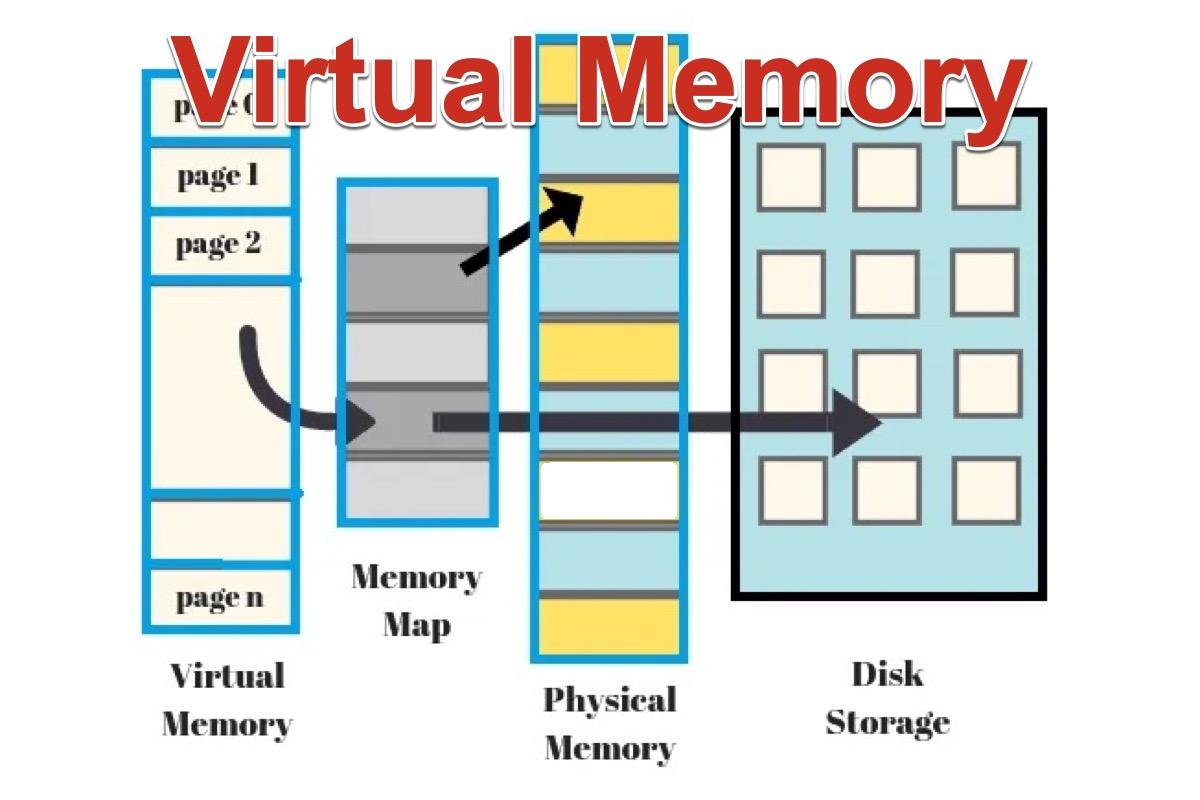
Virtual memory is a key concept in computing that allows a computer to use more memory than is physically available in its RAM (Random Access Memory). It does this by extending the physical memory onto the hard drive or SSD, creating a combination of both that the operating system can use.
Imagine your computer's RAM as a workspace with a limited number of desks. Each desk can hold one task, like a running program or an open file. When all the desks are full, and you need to open another program, there's no space left. This is where virtual memory comes into play.
The operating system takes some of the data that is not being immediately used—like a minimized program or a background process—and moves it from the fast but limited RAM to the slower but more abundant storage space on your hard drive or SSD. This frees up space in RAM for the new task you want to perform. When you need the data that was moved, the operating system swaps it back into RAM, usually moving something else out to make room.
This process of moving data back and forth between RAM and storage is known as "paging" or "swapping." The area on the hard drive used for this purpose is often called a "page file" or "swap space."
1. Increased Memory Capacity: Virtual memory allows your computer to run more applications simultaneously than would be possible with just the physical RAM.
2. Program Execution: Some programs require more memory than the available RAM. Virtual memory allows these programs to run by temporarily offloading some of their data to the hard drive.
3. Smooth Multitasking: It helps the system handle multiple tasks without crashing or slowing down significantly, as the operating system can manage memory more flexibly.
1. Performance Impact: Since hard drives or SSDs are much slower than RAM, accessing data from virtual memory can significantly slow down your computer. This is why computers with more physical RAM perform better, as they rely less on virtual memory.
2. Wear and Tear on SSDs: Constantly writing and reading data from SSDs can wear them out faster, although modern SSDs are quite resilient.
Conclusion
Virtual memory is an essential feature that allows modern computers to run efficiently even when they exceed the physical memory limits. While it comes with a performance trade-off, it's a powerful tool that ensures your computer doesn't run out of memory while handling multiple tasks.