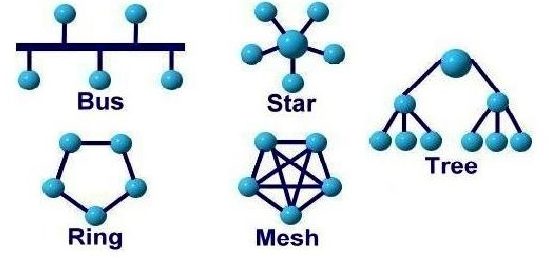
"A-B-C of Networking: Part-1" dealt with the basic concept of networking and "A-B-C of Networking: Part-2 " dealt with how the networking actually takes place which comprised of 5 basic components of networking. This part however deals with how the networking takes place but in different context. This part deals with the arrangement of the systems in a network. In technological terms, schema is often used to describe the arrangement of data while in networking terms, topology is the term used widely.
[Note:Going across various literals, this final part of "A-B-C of networking Part 3" is prepared. The important aspect to look out for in this piece of blog is the justification for the advantages of every topology [after every advantage and disadvantage, justification is provided in square brackets]. Hence, there is less explanation on topology as it can be easily fetched from various sources but justification for the advantages and disadvantages are focused in this blog.]
I. BUS Topology (LINE topology): It is a network setup in which each computer and network device are connected to a single cable or backbone.
NODE: Every individual device, be it a system or a peripheral (external) device, is termed as a node.
BACKBONE CABLE: The single line that runs through the whole network and all the nodes that are part of the topology are connected to this cable directly.
T-CONNECTOR: The point of intersection of every individual node with the backbone line. (As it forms a 'T' Shape)
TERMINATOR: The ends of the backbone line after which there are no nodes connected. there are 2 terminator for the bus line.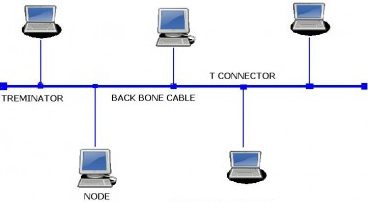
--> It is easy to set-up and extend bus network topology. [Justify: Since all the nodes converge in one single backbone line, increasing the number of nodes would not disturb any other node and hence as long as the backbone can extend, nodes can be added. having said this, there will be problems when there is heavy load on network as every node will attempt to pass data in the backbone and there will be congestion]
--> Bus topology costs very less. [Justify: The cost requires are for the number of components which are required to form the topology and since there is one backbone, there is one one cable needed as main channel.]
--> Difficult to detect and troubleshoot fault at individual station. [Justify: Any fault in the main backbone line can easily be identified but in case of any node getting damaged, gives a hard time for the network administrator at the office because to reach out to the node from just a single line is like searching for a needle in a haystack. Thus if a single node creates trouble in network, troubleshooting it is difficult.]
--> Not suitable for networks with heavy traffic. [Justify: Due to single backbone line, in case of heavy traffic, there will be a congestion. For instance, imagine a 2-way road and single lane for up and down, so there will be traffic at peak time. Similarly, in case of heavy traffic, this topology is not suitable]
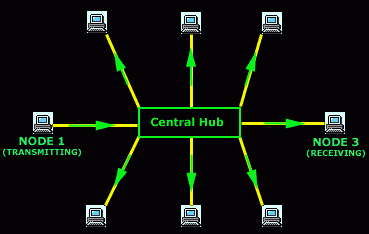
--> Centralized management. It helps in monitoring the network. [Justify: Centralized management simply means that all the nodes give data to the central node and then it is passed on to all other nodes in the network. It proves beneficial because there is one place in the network where all data gets reported in. Its similar to the Principal of a college to whom every faculty, irrespective of the stream, is expected to report to and thus helps the principal to monitor the faculties]
--> Failure of one node or link doesn’t affect the network and thus easy to detect and troubleshoot failure. [Justify: Since all the nodes are not connected to each other, if one of the node fails, it wont have any impact on the network as it is in an isolated network with the central node but central point failure is a very dangerous situation for this topology.]
--> Dependency on central device and if it fails whole network goes down. [Justify: All the devices are connected to one single node and thus single-point failure is catastrophic (very dangerous) for this type of network.]
--> The use of hub, router or switch as central device increases the overall cost of network. [Justify: This relates to the proportion of ports available to the cost i.e a small central device will be cheap but it will also allow less number of devices to get connected and thus more number of ports implies a larger central device which costs more. Number of ports is just one aspect of comparison, there are other aspects in central device that increases its cost]
A-B-C of Networking: Part-3 (Topology [Ring, Tree, Mesh]) ------>>>>