AUTHOR : JYOTI CHOUDHARY
Abstract : -
Nowadays, Internet is very common to use, like for all things and any purpose we have to use internet and for all these we have to surf on internet using browser such as Mozilla, Google Chrome, etc... So, when we search on the internet, many different types of advertisement & pop- ups are coming, which attracts the user & make them to click on that. When the user clicked on those advertisements or pop-ups the page redirected to the page containing virus, through which any type of virus can enter in the system without users knowledge which can affect the system to a great extent. Spyware is a type of software that is used by the attacker for capture or gather the information or login credentials for hacking our computers & websites.
Spyware is software that aims to gather information about a person or organization without their knowledge that may send such information to another entity without the consumer's consent, or that asserts control over a device without the consumer's knowledge.
This paper will give overview of how security is provide on the spyware and the approach to the detection & removal of spyware.
Keywords :- Spyware, Anti-Spyware Software, Information Security
Introduction :-
Spyware is a categorical term given to an application or software which is used by the user, these applications or software log the information that is entered by the user or about the users
online habits & these all information which is captured & gather by those application or software are give it to the software or application creators.
It is a type of potentially unwanted program (PUP) that monitors user’s online behaviors and captures the all credentials which affects the security. It also degrades system performance and affects system dependability. Some other types of PUPs include adware, malware, backdoor, and Trojan horse. Spyware and other PUPs are often distributed with freeware/shareware, but may also be downloaded along with the Web content that users are browsing. For example, freeware and Shareware. Spyware usually gets into the computer through banner ad-based software where the user is enticed to install the software for free. Other sources of spyware include instant messaging, various peer-to-peer applications, popular download managers, online gaming, many porn/crack sites, and more. The most recent delivery methods used by malicious spyware require no permission or interaction with the users at all. Defined as "drive-by downloads," the spyware application is delivered to the user without his knowledge simply when he visits a particular website, opens some zipped files, or clicks on a malicious pop-up ad that contains some active content such as ActiveX, Java Applets, and so on. Spyware can also be hidden in image files or in some cases has been attached with the drivers that come with a new hardware device. Most research undertaken on Spyware is based on levels of Spyware infection on scanned desktop PC’s, for example a survey by National Cyber Security Alliance (NCSA) in 2005 found from 354 respondents 38% had no Spyware protection, yet 83% felt safe from online threats; however 61% of the respondents had a form of Spyware or Adware on their PC. Equally an analysis report on
Spyware from Webroot Software Inc (2005) stated that during the course of the third quarter of 2005, an important and alarming Spyware trend emerged, where many home computer users are admittedly afraid of becoming a victim of identity theft from using the Internet. So some home PC users are worried and others are not. Spyware and Malware can attack your clients computer, execute codes without clients knowledge and travel through the system undetectable. It can be in the form viruses and software applications that can be downloaded in the internet that was not recognize by the user. The use of anti-spyware software lowers the level of risk that the computer users might encounter.
Study :-
Basically the Spyware application or software captures the information or credentials to hack the system through various types of keyloggers.
Keyloggers are applications that monitor a users keystrokes and then send this information back to the malicious user. This can happen via email or to a malicious user's server somewhere on the Internet. These logs can then be used to collect email and online banking usernames and passwords from unsuspecting users or even capture source code being developed in software firms.
Keyloggers can be one of three types:
- . Hardware Keyloggers :- These are small inline devices placed between the keyboard and the computer. Because of their size they can often go undetected for long periods of time -- however, they of course require physical access to the machine. These hardware devices have the power to capture hundreds of keystrokes including banking and email username and
- . Software using a hooking mechanism :- This type logging is accomplished by using the Windows function SetWindowsHookEx() that monitors all keystrokes. The spyware will typically come packaged as an executable file that initiates the hook function, plus a DLL file to handle the logging functions. An application that calls SetWindowsHookEx() is capable of capturing even autocomplete
- . Kernel/driver keyloggers :- This type of keylogger is at the kernel level and receives data directly from the input device (typically, a keyboard). It replaces the core software for interpreting keystrokes. It can be programmed to be virtually undetectable by taking advantage of the fact that it is executed on boot, before any user-level applications Since the program runs at the kernel level, one disadvantage to this approach it that it fails to capture autocomplete passwords, as this information is passed in the application layer.
1 . Self-healing Spyware: Striving for Survivability : -
Spyware may not create its home directory in obvious places such as C:\Program Files because it would be too easy for users to discover. Therefore, spyware programs and data are usually scattered in privileged system directories (e.g. %windows directory%\system32) or temporary directories (e.g. Temporary Internet Files) to bypass a straightforward inspection. Since information stored in Temporary Internet Files directory may incur system stability issues, many files and directories are managed internally by Explorer. For example, Content.IE5 is not accessible to ordinary users.
1.2 Manipulated time property and system calls : -
After spyware program files are hidden deep inside the computer, they may alter the time properties (creation, modification and access time) of their executable files. When users search for potential spyware files in the system, they usually sort the results by time to look for new but suspicious files. In some cases, spyware programs can stay stealthy to common system inspection by using rootkit technology [19] such as intercepting and modifying kernel function ZwQueryDirectoryFile(), which is responsible for querying file and directory information
on Windows 2K/XP, or IFSMgr_InstallFileSystemApiHook(), which is used to install a file system hook inside Windows 98/ME . Apparently, both of these kernel functions require
driver implementation – the former needs to write a new routine in DriverEntry() function to replace old ZwQueryDirectoryFile() and the latter needs to implement a filter function inside the VxD driver [18].
1.3 Randomized filename : -
Like the names of people, the file name of a spyware program is an important attribute that has been used to recognize the spyware. However, nowadays even file names of spyware programs can be either partially or fully randomized for different users on different machines. For example, both Look2Me [20] and VirtuMonde [21] spyware programs would generate randomized filenames.
1.4 Robust execution: Paired processes : -
After spyware programs are installed and executed silently, they could still be discovered and removed. If so, all the intrusion efforts are wasted. Therefore, advanced spyware programs adopt redundant or paired execution of spyware programs to ensure survivability. For example, we find that all 180search Assistant, eXact, BargainBuddy and IBIS Toolbar programs
form its own rescue team of running processes that watch each other – when one process is killed, another one recovers it. We will illustrate the IBIS Toolbar example in the next section. For 16- bit Windows applications, one can check hPrevInstance pointer of WinMain() for the handler of previous instances while for 32-bit Windows applications, one can create Mutex
objects for inter-processes communication to determine whether the corresponding program is up and running.
Analysis :-
To prevent keyloggers on the desktop level two types of anti-keylogging software is available from various vendors:
1 . Signature based anti-keylogger :-
These are applications that typically identify a keylogger based on the files or DLLs that it installs, and the registry entries that it makes. Although it successfully identifies known keyloggers, it fails to identify a keylogger whose signature is not stored in its database. Some anti-spyware applications use this approach, with varying degrees of success.
2 . Hook based anti-keyloggers :-
A hook process in Windows uses the function SetWindowsHookEx(), the same function that hook based keyloggers use. This is used to monitor the system for certain types of events, for instance a keypress/mouse-click -- however, hook based anti-keyloggers block this passing of control from one hook procedure to another. This results in the keylogging software generating no logs at all of the keystroke capture. Although hook based anti-keyloggers are better than signature based anti-keyloggers, note that they still are incapable of stopping kernel-based keyloggers.
There are many different keyloggers available, which captures the information or specially a Credentials that is entered by the user. So, it is very important to analyze or detect those keyloggers. So, the following features of the "Perfect Keylogger" are of use to anyone trying to spy on an unsuspecting user:
- . Stealth Mode :- In this mode no icon is present in the taskbar and the keylogger is virtually hidden.
- . Remote Installation : - The keylogger has a feature whereby it can attach to other programs and can be sent by e-mail to install on the remote PC in stealth It will then send keystrokes, screenshots and websites visited to the attacker by e-mail or via FTP.
- . Smart Rename :- This feature allows a user to rename all keylogger's executable files and registry
This keylogger was installed on a test PC. The following capture, with the help of a tool such as SNAPPER, shows the changes in the files after installing the keylogger, as shown below in Figure 1.
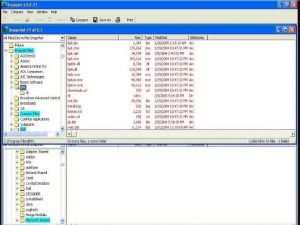
Figure 1. File changes made by the Perfect Keylogger.
This same keylogger was next installed on a different test PC through another program's installer and then configured to send keystrokes captured in an email to a test email-id.
The procedure as described above is the Remote Installation feature. The information sent by email was then captured with the help of a network sniffer. For ease-of-use, Ethereal and the corresponding TCP stream is shown below in Figure 2 and Figure 3.
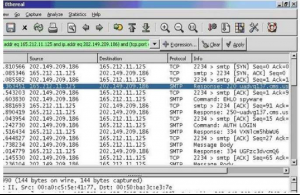
Figure 2. Ethereal captures the keylogger's outgoing email.
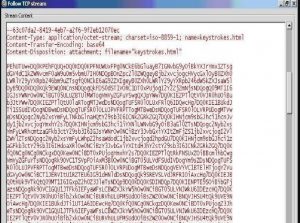
Figure 3. TCP stream of Ethereal capture.
Since the content of this email is base64 encoded, the actual output can be seen only after decoding it with a base64 decoder.
The Stateful Threat-Aware Removal System (STARS) : -
- System Features : -
A Stateful Threat-Aware Removal System (STARS) to remove self-healing spyware. By intercepting critical system APIs, STARS can monitor the activities performed by any running process in a system. Some attributes manipulation activities such as installing files in a hidden directory and altering time property of the files after installation are considered malicious by STARS and thus are prohibited. While existing anti-spyware tools are stateless (memoryless) between spyware removal tasks, STARS is designed to be stateful by monitoring the effectiveness of a spyware removal task over a period of time, setting policies and detecting any violation of the policies as a sign of having self-healing spyware in the system. In order to identify any illegal reincarnation of removed entries, STARS performs Soft Rollback – a procedure which periodically reexecutes the previous removal processes. If there is no
reincarnation of suspicious processes, the re-execution would fail. But if a re-execution is successful, a selfhealing spyware program has been reincarnated. In this case, STARS learns to remember the source of such reincarnation by adding new policy rules to prevent this reincarnation from happening again in the future. In addition, it is necessary to terminate self- healing processes all together and STARS employs the Soft Termination mechanism to kill all of them at once (since self-healing spyware programs can survive after a direct process termination). The idea of Soft Termination is to suspend each member of the rescue team of a spyware one-by- one so that they are not able to watch the status of each other and then terminate the whole set of suspended processes all together.
2. System Implementation : -
The system architecture of STARS is illustrated in Figure 1. The Process Monitoring Engine (PME) is responsible for monitoring running processes and critical APIs of system DLLs. It utilizes Windows API such as Process32First() and Process32Next() to enumerate all on-going processes and intercepts critical APIs that are called by these processes. The Registry Monitoring Module, File/Directory Monitoring Module, and Network Monitoring Module of STARS hook critical Windows API calls by employing the Windows IAT (Import Address Table) redirection mechanism. Functions to be intercepted in a program are imported to the program using the IAT redirection mechanism. In the current implementation of Windows, IAT holds file- relative offsets to the names of imported functions referenced by a program and calls to the imported functions are routed using the IAT with an indirect JMP instruction. We overwrite a specific IAT entry with the address of our desired routine – PME can gain control before the original function gets a chance to be executed. PME provides real-time monitoring as well as internal logging of system activities including 1) registry access, 2) file/directory access, and 3) network access performed by each process. Another core engine called Stateful Removal Engine (SRE) enforces spyware removal actions according to the existing threat-level and a predefined time-constraint. Similar to the System Restore feature of Windows, System Snapshot Manager (SSM) checkpoints ASEPs from time to time. It provides the reference information of a set of healthy ASEPs so that the spyware-infected ASEPs can be detected. Threatlevel Manager (TLM) is able to adjust spyware threatlevel by parsing external logs created by third-party anti-spyware tools. Whenever a spyware threat level is raised, SRE performs Soft Rollback to re-execute the spyware removal procedure from time to time to make sure that the removed entries remain removed. However, if Soft Rollback discovered some removed ASEP entries are being reinserted by a suspicious process, it hands over the process for Soft Termination and enables a policy rule to auto-reject subsequent activities issued by the suspicious process. In other words, STARS can monitor the source of policy violations and insert rules to stop future self-healing of spyware programs. Policy rules are maintained by Policy Configuration Module (PCM), which stores predefined and customized rules in the Policy Database so that PME is able to respond to any spyware event with appropriate reactions. For example, one may configure STARS to reject one set of spyware processes, but accept another set of spyware processes to log their activities.
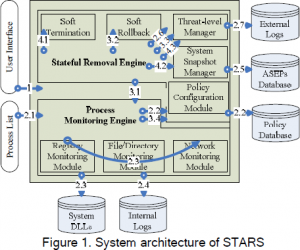
3. STARS Detection and Recovery Procedure : -
STARS procedure is described as follows:
Step 1. Initialization:
STARS is launched, Stateful Removal Engine and Process Monitoring Engine are both activated.
Step 2. When spyware threat-level is low:
2.1. Process enumeration:
Enumerate all running processes and applies default rules accordingly. 2.2. Policy configuration:
With Policy Configuration Module, one can add new rules or customize existing rules to instruct STARS to either accept or reject a given request. All policy rules are maintained in the Policy Database.
2.3. API monitoring:
Registry Monitoring Module, File/Directory Monitoring Module, and Network Monitoring Module hooked critical APIs of system DLLs to control their calls according to the defined policy rules.
2.4. Activity logging:
The subsequent activities taken by each process may also be logged in Internal Logs.
2.5. Snapshot maintenance:
System Snapshot Manager checkpoints ASEP periodically for future rollback and recovery.
2.6. Process monitoring:
User may occasionally run some third-party anti-spyware tools (e.g. Ad-Aware SE Personal 1.06) and Threat-level Manager is informed of its presence (e.g. Ad-Aware.exe).
2.7. Log monitoring:
Parse the External Logs of the antispyware tools (e.g. C:\Documents and Settings\[User]\Application Data\Lavasoft\Ad- Aware\Logs). If evidence of spyware threat is found, the threat-level is raised from low to medium and STARS jumps to step 3.1.
Step 3. When spyware threat-level is medium :-
3.1. Removed ASEP entry monitoring:
As threat-level is changed to medium, SRE instructs PME to log all system activities and identify any action that violates existing policy rules – i.e. a recreation of the removed ASEP entries which indicates the existence of selfhealing spyware. If a violation is detected, go to step
3.4. If not, continue to step 3.2.
3.2. Soft Rollback:
In addition to ASEP monitoring, STARS redoes spyware removals periodically. If there
is no reincarnation of suspicious processes, the redo would fail. But if a redo is successful, self- healing spyware process is reincarnated and STARS will learn to remember the source of such reincarnation by adding new policy rules to auto-reject them next time. In this case, the threat- level is raised to high and the STARS jumps to step 3.4.
3.3. Returning to low threat level:
If no suspicious activities are detected within a certain interval (e.g. 10 minutes), Threat-level Manager reduces the threat-level to low and STARS go to step 2. Otherwise, go to step 3.1
3.4. Identifying suspicious processes:
With the occurrence of policy violation, STARS identifies the self-healing spyware (and members of the rescue team) and learns to add new policy rules to auto-reject them next time. Threat-level is raised to high and STARS go to step 4.1.
Step 4. When spyware threat-level is high :- 4.1. Soft Termination:
STARS employs Soft Termination to terminate the detected self-healing processes and kill their rescue team.
4.2. ASEP rollback:
STARS recovers ASEP entries that do not exist in the previous ASEP checkpoint.
4.3. Returning to medium threat level:
Then, STARS reduces the threat-level to medium and go to Step 3.1.
Methodology : -
Generally speaking, the low threat level indicates no spyware has been found recently and STARS simply performs process monitoring and API interception which consumes very minimal system resources. Meanwhile, STARS monitors external logs of third party anti-spyware tools to determine the existence of known spyware programs. When STARS is in the medium threat level, not only all system activities are logged but also Soft Rollback is applied from time to time which may incur more performance overhead. However, the longer it stays in the medium threat state, the better chance STARS can detect a self-healing spyware with its rescue team and insert new policy rules to block future reincarnation of the spyware. Therefore, the duration for STARS to stay in the medium threat level after a spyware is detected is a tradeoff between security and performance. Our experience shows that most self-healing spyware processes today reincarnate themselves immediately after a spyware removal procedure is complete. If a self-healing spyware
in a system is detected, STARS would elevate its state to the high threat level. Then it launches Soft Termination to remove all self-healing spyware processes from the system immediately and restores ASEP entries from the previous ASEP checkpoint.
Since spyware has looked at keyloggers, it was found worthwhile to include a section on how to avoid keystroke capture. Keyloggers, both hardware and software, are basically designed to capture what a user types on the keyboard. On the web application side, one method to avoid keystroke capture is to use a virtual keyboard for entering the username and password. A virtual keyboard is analogous to a graphical keypad where a user clicks on the characters rather than types them on the keyboard. This approach may not be practical for every user, for obvious reasons. However, it can be still be useful for very sensitive applications. Note however that even this approach is not completely secure, as some keyloggers are designed to capture screenshots on every mouse-click. Thus, the password of the user can still be found out when a virtual keyboard is used by looking at the screenshots and getting all the characters clicked corresponding to the mouse click. To avoid this, some virtual keyboards also have a feature that allows a user to enter a character by hovering the mouse cursor over a letter for a few seconds.
Conclusion :-
This review paper concludes that an approach to spyware detection & removal is necessary for Privacy & security purpose like Email login, netbanking types of site & also many different type of websites data or important information. Using different types of antispyware the users can prevent their data from anonymous user. So, in this paper for prevention of confidential information, the two main types of antispyware method is used. To prevent from keyloggers, antikeyloggers such as signature –based & Hook-based antikeyloggers are used and for the self- healing spyware STARS system is used.
Future Enhancement :-
For the removal of self-healing spyware the STARS system or method is used.
Which is very lengthy process to detect or analyze the spyware. In future some research has to be done on the STARS system to make it easy to use so that the user can easily prevent their confidential information before attacked by the attacker. A software can be developed in future Which should be the combination of different types of keyloggers which can prevent the whole system alone.
Bibliography :-
- Harrison , Bollinger T. (Nov.-Dec. 2004), User Confidence – and the Software Developer, IEEE Software, Vol. 21, Iss. 6,
- Awad, N. F. and Fitzgerald, K. (2005). The deceptive behaviors that offend us most aboutCommunications of the ACM, 48, (8)