We are terrible at passwords. Simply put, we suck at creating them and sharing them way too freely. Indeed, the very thing that can ensure our online security has become our biggest obstacle to it. And if you think you have good reasons not to use a password manager, we can tell you why you’re wrong.
The best password managers relieve you of the burden of having to create and memorize unique, complex logins on your own. And they protect your passwords by encrypting your login info in a virtual vault—either locally or in the cloud—only allowing access with a single master password. If you’re looking to step up your security game, a password manager is a way to do it. Yes, web browsers are starting to offer password management features, but they’re not good enough.
All of our top picks for password managers support Windows, Mac OS, Android, and iOS, as well as the major browsers. And all will let you sync your data across multiple devices, though you may have to pay extra for that privilege.
Once you’ve found the right password manager for your needs, head over to our guide on mastering your password manager.
LastPass ticks all the boxes on our password manager wish list. It makes it a breeze to create unique, complex passwords; capture and manage login credentials; sync them across multiple devices; and share them with others you trust. Its password auditing and updating features help you identify and eliminate weak or duplicate passwords with just a mouse click or two. LastPass also stores credit card numbers and other personal data to autofill web forms when you’re making a purchase, signing up for a service, or paying a bill.
LastPass supports a range of multi-factor authentication options for protecting your vault, including app-based authenticators like Symantec VIP and Google Authenticator, hardware tokens like YubiKey, and fingerprint readers. Given the rich features it provides, LastPass should be one of the first password managers you try—and don’t be surprised if it’s the last.
Dashlane is the strongest contender for LastPass’s crown. It has a beautiful interface, is easy to use, and is stocked with features to help you strengthen your online security. Chief among these is a stellar security dashboard that grades your passwords and suggests actions for boosting your score and your protection. Dashlane is free for a single device, but if you want syncing across multiple devices you’ll need a paid plan: the $60-per-year Premium plan or the $90-per-year Family plan that covers six accounts. These prices are at the higher end, high quality of the program notwithstanding.
At this point, Dashlane’s features and capabilities are on-par with LastPass. The main differentiator between the two is price. LastPass comes in a bit cheaper and that’s why Dashlane is our runner-up. But if expense isn’t a concern, Dashlane is still a top-shelf option.
It’s a consumer’s market when it comes to password managers. While we have our clear favorites above, Keeper is a very strong contender in its own right. It emphasizes security more so than many other password managers. For instance, it eschews an automatic password update feature as even this process would require temporary access to your credentials.
While Keeper’s security-above-all-else mindset makes it one of the best, it comes at the expense of things some consumers prize such as ease of use and aesthetics. To their credit, Keeper seems to recognize this and has taken strides to update its interface to be more user-friendly. While security-minded users stand to get the most out of Keeper’s robust features set, even the everyday user will be safer for using it.
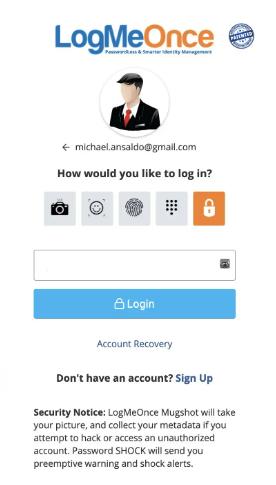
While most password managers require a master password to access your password vault, LogMeOnce relieves you of having to remember even that. It uniquely offers the option of a PIN, biometric, or photo login to access your vault. This feature gives LogMeOnce a unique edge over other password managers.
Other than this distinctive feature, LogMeOnce operates similarly to its peers. It allows you to store and sync passwords and credit cards across your devices with end-to-end encryption. It also includes other features such as dark web and cyber threat monitoring, but these will come at a bit of an additional cost. Its unique features make LogMeOnce one of the most convenient password managers we’ve tested.
Bitwarden offers a generous free plan that makes it a great option for users on a budget. Unlike a lot of other password managers that place heavy restrictions on free users, Bitwarden lets you save unlimited vault items and sync your vault across all of your devices. And it allows you to do all of this without charging you a penny.
While it may not be the most user-friendly, and it lacks some of the advanced features offered by the paid services, Bitwarden still allows you to upgrade your security at no additional expense. It does offer a paid tier, but its free tier includes so many features that you probably won’t need anything more.
Free password managers come in all sorts of different flavors. Check out our roundup of the best free password managers for more information.
At their most basic, password managers capture your username and password—usually via a browser plugin—when you log in to a website, and then automatically fill in your credentials when you return to that site. They store all your passwords in an encrypted database, often referred to as a “vault,” which you protect with a single master password.
Of course, most password managers do much more than this and many extend protection beyond your login credentials to other types of personal data. We narrowed it down to a few essential features that we looked for and you should too:
No online security measure is 100 percent foolproof, but most security experts agree that password managers are still the safest way for people to manage their myriad logins, and we agree that the benefits far outweigh the risks. Just choose your password manager carefully after researching all the options starting with this guide.