Virtual Machine:
virtual machine is like a computer inside your computer.For eg: Imagine a big box containing a small box inside, here the small box is the virtual machine that has its own operating system,memory and processing power.
Why do we need virtual machine?
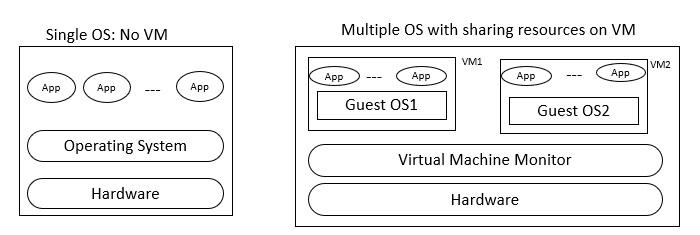
Each PC or server would run only one OS at a time. Thus, the vendor had to rewrite parts of its applications for each OS/platform they would run on.So to run many operating system or multiple sessions of a single OS virtual machine were used.
How do virtual machines work?
Virtual machines use virtualization technology to create virtual hardware—or a virtual version of a computer on a physical machine. The physical machine on which the VMs run is called the host, and the VMs running on the host are called guests.
Types of Virtual machine:
1. System virtual machine: It emulate an entire computer system, including the hardware and operating system. It allows to run
multiple operating systems.For eg using a mac-only application on windows for the ability to run mac-only application.
2. Process virtual machine:It is designed to run a single program and not entire operating system.for eg Java Virtual machines,
common language runtime.
3. Hypervisor-based Virtual Machine: It is used to run multiple "virtual" computers on a single physical computer.It is like a traffic controller for virtual machines.It consists of two types mainly Bare-metal Hypervisor and Hosted Hypervisor.When a hypervisor is installed directly on the hardware of a physical machine, between the hardware and the operating system (OS), it is called a bare metal hypervisor.
Hosted Hypervisors : Hosted Hypervisors operate within the physical host machine’s operating system. Therefore, it is called the hosted hypervisor. In contrast with bare-metal hypervisors, these operate directly on the machine hardware with one software layer.
4. Nested virtual machine:Nested virtual machine refers to the ability to run a virtual machine (VM) inside another VM. In traditional virtualization scenarios, a hypervisor runs directly on the physical hardware, and VMs are created and managed on top of the hypervisor. With nested virtualization, a virtual machine can act as a host for another layer of virtualization, allowing you to run VMs within VMs.