 Author : Firdous Shaikh
Let’s understand Buffer Overflow
A
buffer is a temporary area for data storage (also used for storing program code). When more data (than was originally allocated to be stored) gets placed by a program or system process, the extra data overflows. It causes some of that data to leak out into other buffers, which can corrupt or overwrite whatever data they were holding. If this overwrites adjacent data or executable code, this may result in wrong program behaviour, including memory access errors, incorrect results, and
crashes. Exploiting the behaviour of a buffer overflow is a well-known
security exploit. On many systems, the memory layout of a program, or the system as a whole, is well defined. By sending in data designed to cause a buffer overflow, it is possible to write into areas known to hold
executable code and replace it with
malicious code.
The Buffer Overflow attack example
C and
C++ programming languages provide no built-in protection against accessing or overwriting data in any part of memory and do not automatically check, whether the data written in the data-type is within its boundaries.
So here, we use an
array which is a built-in buffer data type, that can intake inputs for our demo.
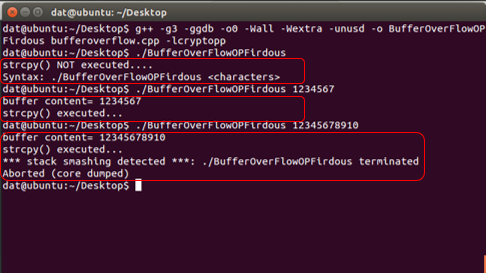
The program works perfect when the inputs are inside the range, but when value size increases the range, the access violation, segmentation fault error is encountered by the user, given by the system:
***stack smashing detected***: [execution] terminated
Aborted (core dumped)
Our program is prototype to a larger and more diverse attack consequence, and much fierce attacks can take down entire RAM capacities to crash (also traits of a Denial of Service attack).
The Program… Explained!
- The program starts with creating a character buffer, in which we will pass a string to test its range.
- The buffer (array) here, is 5 bytes plus the terminating NULL.
- Thus Maximum allocation can be 2 double words, i.e. we need to input more than 8 bytes for the buffer overflow to take place.
- That the user does not provide a value, the program handles that by terminating.
- If there is an input, the strcpy() copies the user input to the buffer, without any bound checking.
- Finally, the output is according to the input range.
The Program
#include <stdio.h>
#include <string.h>
#include <stdlib.h>
int main(int argc, char *argv[])
{
char buffer[5];
if (argc < 2)
{
printf("strcpy() NOT executed....\n");
printf("Syntax: %s <characters>\n", argv[0]);
exit(0);
}
strcpy(buffer, argv[1]);
printf("buffer content= %s\n", buffer);
// you may want to try strcpy_s()
printf("strcpy() executed...\n");
return 0;
}
Steps for execution
(The C program can be run in its compiler, over all platforms. Here we have used Ubuntu Linux).
- Save the program in any editor with the extension .cpp (blowfish.cpp)
- Make sure you have the compiler, interpreter installed. In the terminal, type the following.
sudo apt-get install g++
sudo apt-get update
- To compile the program, type:
g++ -g3 –ggdb -o0 –Wall –Wextra –unused –o BufferOverFlowOP bufferoverflow.cpp –lcryptopp
- To run the program, type:
./BlowfishOP [input range]
The Output: