That's right, fonts are not created equal. People create different kinds of fonts for all kinds of reasons: to convey a message, for decoration, embellishment or as iconography.
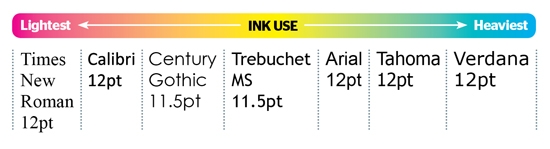 The theory is, if you use a 'lighter' font (with a lighter stroke), you'll use slightly less ink per page. Based on the assumption that you're only printing with inkjet printers that use the old style cartridges (not ink tanks, and not toner-based laser printers), you'll likely save about 10 percent ink by switching to one of the lighter fonts.
You probably don't even think before composing a one-line email message and sending it. But it wasn't always so easy. There's an interesting clip on YouTube: "How to send an Email – Database – 1984". This was from a tech TV show called Database and the presenters demonstrated what it took to actually send an email back in those days.
You had to use a computer and a rotary telephone to connect to a service called Micronet. This was pre-WWW, so there were no URLs, just numbered web pages. For emails, the web page number was 7776.There are actually two theories to this. The first one starts to make sense when you look at manual typewriters. If someone typed too fast, the keys would jam. QWERTY placed common alphabets at a distance from each other and slowed typists down.
Another theory is that telegraph operators designed the QWERTY layout because it was easier (and faster) to decipher Morse code.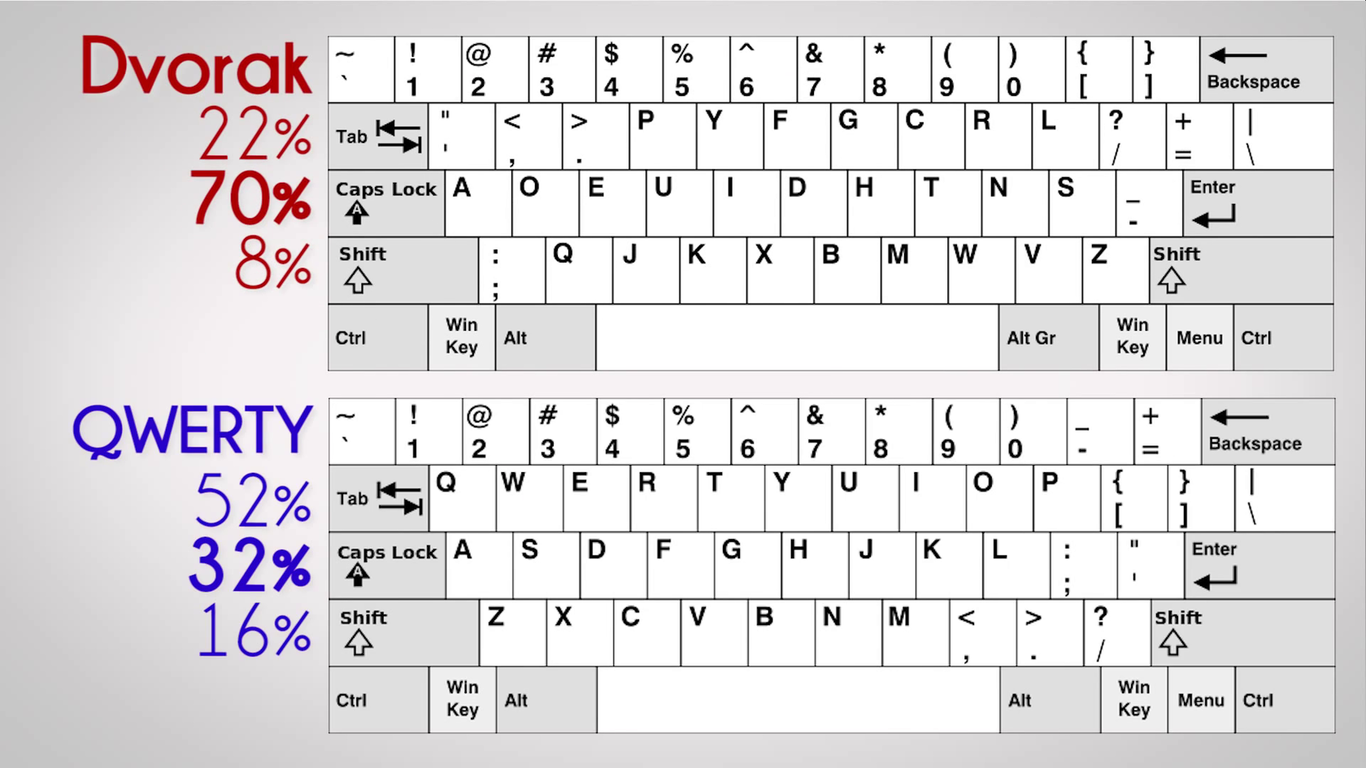 Either way, there was no reason to keep using the layout, but it stuck and there was resistance to change. You can actually change your keyboard layout to the faster Dvorak layout in the language settings (or just buy a new Dvorak keyboard)
This means that most of the money you earn, transact with, use to buy goods/services and so on exists only on computers and hard drives. Only an estimated 8 percent of currency globally is physical money.
All the black money piles come from within this 8 percent. This is a fair estimate that economists seem to agree on though, not an exact figure. This low percentage seems absurd but when you stop to think, it makes sense considering that most large transactions are done electronically anyway. Banks store electronically too and the 92 percent includes all kinds of transactions done using credit/debit cards and wire transfers. Might be a good idea to revisit all those hacker movies where a nerdy computer hacker manages to siphon billions off in just a few minutes.Nobody really knew what the internet was capable of back then and this was a huge opportunity for people to own all kinds of doing domain names. It was in 1995 that a company called Network Solutions was granted the rights to charge people for domain names. And it was expensive too: prices typically started at $100 per two years of registration.
As much as 30 percent of this was a fee that went to the National Science Foundation to create an 'Internet Intellectual Infrastructure Fund'. This fee was later reversed in 1997, bringing the charge down to $70 for two years.
It was 1956 when IBM launched RAMAC, the first computer with something like a hard drive that we use today.
By hard drive, we mean something that used magnetic disks - a moving head was used to access and write that data. At the time, it was considered a massive leap in mass storage technology because it signified a shift: from punch cards and magnetic tape (which stored data sequentially) to randomly accessible hard drives. RAMAC itself stood for Random Access Method of Accounting & Control. The whole cabinet weighed over 1000kg and the 5MP data was spread over 50 huge aluminum disks, coated with magnetic iron oxide. The disks rotated at a speed of 1200rpm and the machines were leased for $3,200 per month back in the day.When the first pointing device was invented in the early 60's by Douglas Engelbart and Bill English (they were part of the Stanford Research Institute), it was called the X-Y Position Indicator for Display Systems (referring of course, to the X & Y axes).
It was first used with the Xerox Alto computer and demonstrated in 1968 by Engelbart in what is called the 'Mother of all demos' (check it out on YouTube). In 1968, Engelbart showed off word processing, graphics, windows, file linking and control using a 'mouse' – all these things made their way into modern computers. Engelbart was also responsible for the name mouse, coined simply because the cable sticking out the end of the device reminded him of a rodent's tail.Before the miniaturization of transistors, computers had a much more visible system of counting: things like gears, pivots, beads and levers were often used and they needed some sort of power source to function.
Vladimir Lukyanov built something like this in 1936 but he used water to create a computer that solved partial differential equations. In images of the Lukyanov computer, you'll see a complex system of interconnected tubes filled with water. Adjusting taps and plugs altered the flow of water (and changed variables) while the end result was seen by measuring the level of water in certain tubes. It was also called a Water Integrator and was originally designed to solve the problem of cracking in concrete. It's now found in Moscow's Polytechnic Museum.Before smartphones, there was a time when digital diaries and advanced calculators were popular. They could be used to store simple forms of data and to perform calculations that students could use while solving differential equations apart from algebra and calculus capabilities.
While advanced calculators were 'allowed' to be taken into exam halls, many tests banned devices if they had QWERTY keyboards, simply because they fitted into the traditional definition of a 'computer'. Texas Instruments solved the problem by introducing graphing calculators with keyboards that had an alphabetical layout.Wikipedia's mission is to make knowledge freely available to anyone with access to the Internet. However, anyone with internet can also sign up and edit pages – which results in what they call vandalism (someone purposefully altering facts with malice).
There is a very robust moderation system but there's only so much that a person can do, in terms of actively monitoring changes and correcting changes that vandals make.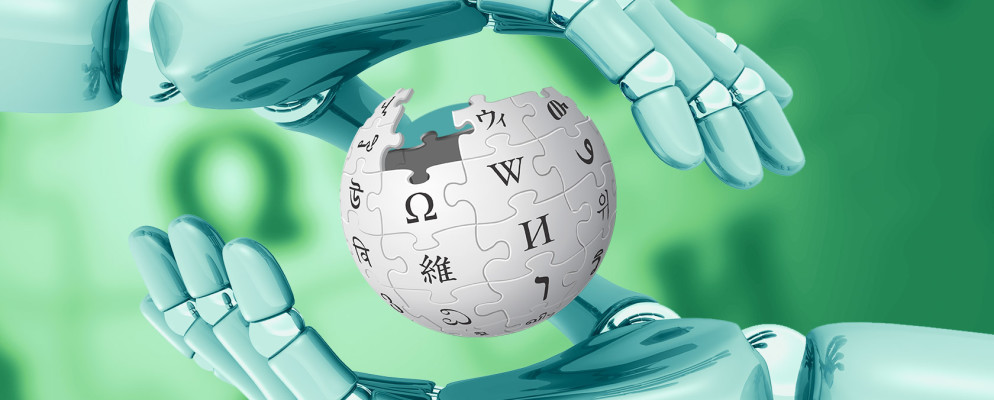 That's where the bots — essentially computer programs — come in. The bots (like ClueBot-NG) keep a track of all changes made to any page and instantly revert back to the 'correct' version if a vandal decides to change things. About 1,941 bots are authorized for use on the 38,818,162 Wikipedia pages at last count.