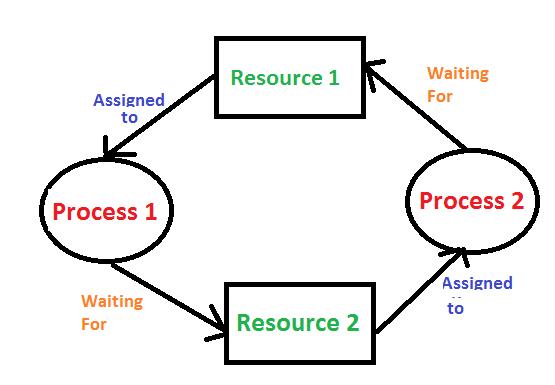
In an operating system, a deadlock occurs when a set of processes get stuck because each process is waiting for a resource that another process in the set is holding. None of the processes can proceed because they are all waiting for resources that are currently being held by each other, creating a cycle of dependency.
- Conditions for Deadlock: A deadlock happens when all of these four conditions occur simultaneously:
- Mutual Exclusion: At least one resource must be held in a non-shareable mode (i.e., only one process can use the resource at a time).
- Hold and Wait: Processes holding resources can request new ones without releasing what they already have.
- No Preemption: Resources cannot be forcibly taken away from a process; they must be released voluntarily.
- Circular Wait: A circular chain of processes exists where each process is waiting for a resource held by the next process in the chain.
Operating systems use various strategies to handle deadlocks:
- Deadlock Prevention: Modify the system to prevent one of the four conditions from occurring.
- Deadlock Avoidance: Use algorithms like Banker's Algorithm to avoid unsafe states.
- Deadlock Detection and Recovery: Allow deadlocks to happen, but detect and resolve them by terminating or preempting processes.
- Ignoring Deadlock: In some systems (e.g., UNIX), deadlocks are ignored under the assumption that they are rare.
In an easier way to understand, imagine you're playing a game with your friends, and you all want to use each other's toys at the same time. But no one is willing to share until they get the toy they want. Now, everyone is stuck waiting, and no one can keep playing.
In an operating system, a deadlock is like that. It's when programs are waiting for resources (like memory or files) that another program is using. But since each program is waiting and won't give up what it already has, they all get stuck and can't continue.