You’ve probably heard the adage “information is power” and that is certainly true when it comes to cybercrime. Access to your personal information is what gives hackers the power to tap into your accounts and steal your money or your identity. But the right information can also empower you to protect yourself from being caught up in the thriving industry that is cybercrime.With that in mind, here is Top 10 list of steps you can take to avoid becoming a victim of cybercrime.
1) Education :
Hackers aren’t the only ones who can gain power from information. By educating yourself about the types of scams that exist on the Internet and how to avert them, you are putting yourself one step ahead of the cyber-criminals. Since phishing is prevalent, read up on the latest phishing scams and learn how to recognize a phishing attempt. Remember, phishing is when hackers attempt to lure you into revealing personal information by pretending to be a legitimate organization or person. These scams often play off major new stories, so keep informed on the latest news-related scams.
2) Use a firewall :
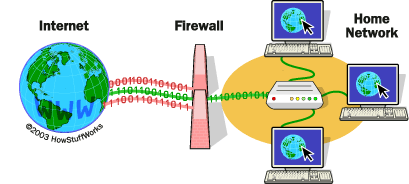
Firewalls monitor traffic between your computer or network and the Internet and serve as a great first line of defense when it comes to keeping intruders out. Make sure to use the firewall that comes with your security software. And if you have a home wireless network, enable the firewall that comes with your router.
3) Click with caution :
When you’re checking your email or chatting over instant messenger (IM), be careful not to click on any links in messages from people you don’t know. The link could take you to a fake website that asks for your private information, such as user names and passwords, or it could download malware onto your computer. Even if the message is from someone you know, be cautious. Some viruses replicate and spread through email, so look for information that indicates that the message is legitimate.
4) Practice safe surfing :
When navigating the web, you need to take precautions to avoid phony websites that ask for your personal information and pages that contain malware. Use a search engine to help you navigate to the correct web address since it will correct misspellings. That way, you won’t wind up on a fake page at a commonly misspelled address.
(Creating a phony site at an address similar to the real site is called “typosquatting” and it is a fairly common scam.) You may also want to use a product like McAfee-SiteAdvisor® software to help you navigate. SiteAdvisor software is a free browser tool that tells you if a site is safe or not right in your search results, so you are warned before you click.
5) Practice safe shopping :
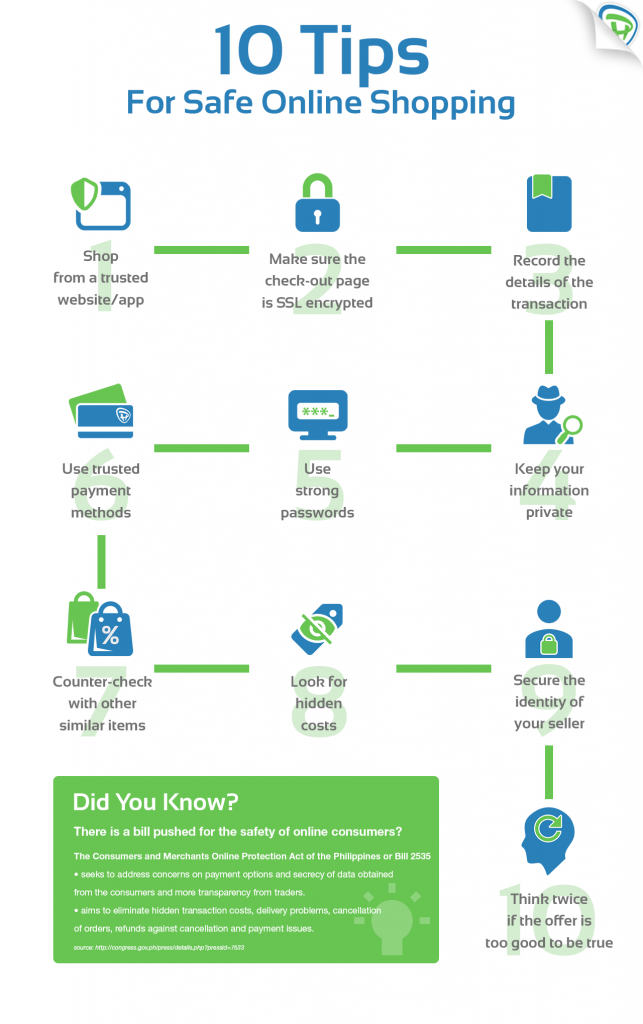
In addition to practicing safe surfing, you also need to be careful where you shop online. Be cautious when shopping at a site that you’ve never visited before and do a little investigation before you enter your payment information. Look for a trustmark to tell you if a site is safe. And when you’re on a payment page, look for the lock symbol in your browser, indicating that the site uses encryption, or scrambling, to keep your information safe. Click on the icon to make sure that the security certificate pertains to the site you are on.You also want to look at the address bar to see if the site starts with “https://” instead of “http://” because this is another way to see if the site uses encryption. When it comes time to pay, use a credit card instead of a debit card. If the site turns out to be fraudulent your credit card issuer may reimburse you for the charges, but with a debit card your money is gone. Finally, evaluate the site’s security and privacy policies in regards to your personal data.
6) Use comprehensive security software and keep your system updated :
Because hackers have a wide variety of ways to access your system and information, you need comprehensive security software that can protect you from all angles. Just make sure that you keep your security software up to date by selecting the automatic update function on your security control panel. And don’t forget to perform regular scans. You also want to update your operating system (OS) and browser with the latest security patches. If you are a Microsoft Windows user, you can enable automatic updates to keep your OS safe.
7) Secure your wireless network :
Hackers can access data while it’s in transit on an unsecured wireless network. You can keep the hackers out by enabling the firewall on your router and changing the router’s administrator password. Cybercriminals often know the default passwords and they can use them to hack into your network. You may also want to set up your router so it only allows access to people with passwords that are encrypted. Check your owner’s manual for instructions on setting up encryption.
8) Use strong passwords :
Although it may be easier for you to remember short passwords that reference your birthday, middle name, or pet’s name, these kinds of passwords also make it easy for hackers. Strong passwords can go a long way in helping secure your information, so choose a password that is at least 10 characters long and consists of a combination of letters, numbers and special characters. Also consider changing your password periodically to reduce the likelihood of it being compromised.
9) Use common sense :
Despite the warnings, cybercrime is increasing, fueled by common mistakes people make such as responding to spam and downloading attachments from people they don’t know. So, use common sense whenever you’re on the Internet. Never post personal information online or share sensitive information such as your social security number and credit card number. Exercise caution when clicking on any links or downloading any programs.
10) Be suspicious :
Even if you consider yourself cyber savvy, you still need to keep your guard up for any new tricks and be proactive about your safety. Backup your data regularly in case anything goes wrong, and monitor your accounts and credit reports to make sure that a hacker has not stolen your information or identity. Although protecting yourself does take some effort, remember that there are a lot of resources and tools to help you. And by adopting a few precautions and best practices, you can help keep cybercrime from growing.Found it Interesting? Lots of Interesting Stuff is waiting for you on my blog.
Follow Me Here : Taha ChatriwalaStay Secure ! Stay Happy !!